
How to Choose Self Storage Software for Your Facility?
Choose self storage software by matching the system to your facility’s daily work, tenant needs, and growth plans. The right platform should manage units, rentals, payments, leases, gate access, reports, and customer messages in one clean place. It should be simple enough for office staff and strong enough for owners who want better control. A storage facility owner should choose the tool that saves time, reduces errors, and keeps renters moving without confusion.
A local storage business has more moving parts than many people think. Tenants may need drive-up units, climate-controlled units, vehicle storage, boat storage, RV storage, or short-term space during a move. Staff may handle phone calls, late rent, move-ins, move-outs, gate codes, and walk-in customers on the same day. A clear system keeps these jobs organized so the rental office does not feel scattered.
Quick Software Selection Guide for Storage Owners
| Facility need | What to check in the software | Why it matters |
| More online rentals | Online booking, unit size pages, and simple rental steps | Renters can reserve a storage unit without calling the office. |
| Better rent collection | Online payments, auto billing, reminders, and receipts | Staff spend less time chasing late payments. |
| Clear unit tracking | Vacant, rented, reserved, and overdue unit status | The team avoids double bookings and wrong unit records. |
| Easier tenant management | Tenant profiles, lease notes, payment history, and contact details | Staff can handle customer questions faster. |
| Stronger local service | Email, SMS, and quick account updates | Local renters get clearer communication during move-in and payment. |
| Better facility control | Occupancy reports, revenue reports, and late payment reports | Owners can see what is happening without checking manual files. |
| Secure access | Gate access, keypad support, or smart lock connection | Tenant access can be managed based on rental and payment status. |
| Future growth | Multi-location support, staff roles, and scalable features | The system can support the business as more units or locations are added. |
Self Storage Software and Its Role in Facility Management
Self Storage Software helps a facility manage daily work from one system. It keeps unit status, tenant records, rent payments, lease notes, invoices, and reports easier to check. This matters when a customer calls about a unit, a payment, or a gate code. Staff can answer faster because the information is not spread across files and spreadsheets.
For owners, the main value is control. They can check occupancy, revenue, unpaid rent, move-ins, and move-outs without waiting for manual updates. This is useful for single-site owners and multi-location operators. It also helps when the business serves local renters, contractors, college students, homeowners, and small companies.
Problems Storage Owners Face Without Proper Software
Many storage owners start with spreadsheets, notebooks, phone notes, or basic accounting tools. These methods can work for a small site at the beginning. But once more tenants come in, the rental office can become hard to manage. Small mistakes can affect payments, access, customer service, and available units.
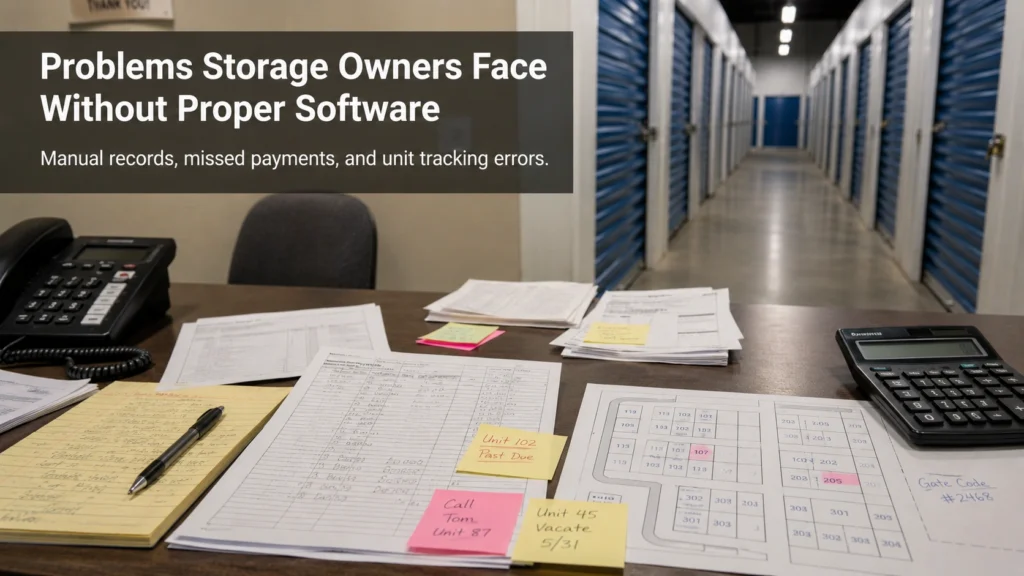
Common problems include:
- Unit availability is not updated on time.
- A reserved unit still looks open.
- Late rent follow-up is missed.
- Gate codes are updated by hand.
- Tenant contact details are stored in different places.
- Lease notes are hard to check.
- Staff cannot see the full payment history.
- Owners do not have clear occupancy reports.
- Local marketing calls are not tracked well.
- Move-in and move-out records are incomplete.
These problems do not always mean the team is doing poor work. Often, the facility has outgrown its old process. A better system gives the team one place to check and update key details. That can reduce stress during busy rental days.
Main Tasks Storage Software Should Handle
A storage management platform should support the work that happens every week. It should help with front desk tasks, online rentals, payments, tenant records, and owner reports. It should also support local storage searches when renters want a unit near their home, shop, campus, or job site. The system should make the rental path easy from the first inquiry to move-out.
Main tasks should include:
- Online unit reservations.
- Move-in and move-out records.
- Unit status for vacant, rented, reserved, and overdue units.
- Tenant profiles with phone, email, address, and lease details.
- Rent collection and payment tracking.
- Auto billing and payment reminders.
- Invoices, receipts, and late fee records.
- Gate access or keypad support.
- Occupancy and revenue reports.
- Email and SMS updates.
- Staff roles and account permissions.
- Website lead tracking.
These tasks help a facility respond faster. A manager should not need five tools to answer one tenant question. A renter should not need several calls just to pay rent or check account details. A cleaner workflow can improve both office work and customer service.
Features That Matter Most for Storage Facilities
The best platform is not always the one with the longest feature list. The best option is the one that solves real problems at your facility. A small mini storage site may need simple rentals and payments. A larger location may need gate access, dynamic pricing, multi-site reports, and stronger automation.
Focus on features that save time and protect revenue:
- Online rentals and reservations.
- Real-time unit availability.
- Tenant and lease management.
- Online payments and auto billing.
- Gate access control support.
- Late payment tracking.
- Local reporting by unit type and size.
- Website and lead tools.
- Email and SMS communication.
- Owner dashboard.
Online Unit Reservations
Online reservations help renters choose a unit without waiting for office hours. This is useful for people who are moving, storing business items, or handling a quick life change. The page should show unit size, price, availability, and the next step. The rental office should receive the new reservation without double entry.
For local SEO, this also supports searches like storage units near me, climate-controlled storage, drive-up storage, and vehicle storage. If the website has clear unit pages, renters can act faster. This can help the facility win leads before a competitor answers the phone. A smooth rental path matters most in busy markets.
Real-Time Unit Availability
Real-time availability shows which units are vacant, rented, reserved, or past due. This helps staff avoid wrong bookings. It also helps owners see which unit sizes are in demand. If 10×10 units move faster than 5×5 units, the owner can adjust pricing or marketing.
This feature is important in local markets with seasonal demand. College towns may see demand before semester changes. Tourist areas may need more boat or RV storage during certain months. Clear unit tracking helps owners react faster.
Tenant and Lease Management
Tenant management keeps names, phone numbers, emails, lease details, move-in dates, payment history, and account notes in one place. This helps staff handle calls without asking the same questions again. It also gives owners a cleaner record if there is a payment issue or lease question. Good records reduce confusion.
Lease management is also important for long-term tenants. Many renters stay longer than expected. When records are clean, renewals, notices, reminders, and account updates are easier. This helps the facility keep service consistent.
Online Payments and Auto Billing
Online payments help tenants pay rent without visiting the office. Auto billing can reduce missed rent when tenants agree to recurring payments. Payment reminders help renters stay on schedule. Receipts and late fee records also make account history easier to manage.
This is a major benefit for small local operators. Owners can spend less time chasing rent and more time handling sales, maintenance, and customer care. Tenants also get a more modern payment experience. That can improve trust and reduce calls about balances.
Access Control Support
Access control is important for facilities with gates, keypads, smart locks, or secure entry points. A system should help connect tenant status with access rights. If a tenant moves in, pays, or becomes past due, access rules should be easier to manage. This reduces manual gate code work.
Security also affects customer trust. Renters want to know their stored items are protected. Clear access logs and better control can help staff handle questions with confidence. This is useful for household storage, business storage, vehicle storage, and contractor units.
Reports for Better Decisions
Reports help owners see how the facility is performing. Useful reports include occupancy, revenue, overdue accounts, move-ins, move-outs, unit size demand, and payment trends. These numbers help owners make better choices about pricing, staffing, and marketing. Reports also help when planning new units or promotions.
Local reports are especially useful. A facility in a soft market may need stronger follow-up and better online rental pages. A facility with high occupancy may need pricing checks and waitlist management. Better reports turn daily data into practical decisions.
Better Tenant Experience With the Right Software
Tenants want a rental process that is fast and clear. They may be dealing with moving, home repairs, college breaks, business inventory, or family changes. A slow process can push them to another local facility. A better system helps them rent, pay, and get updates without extra stress.

Good tenant experience can include:
- Clear unit sizes and prices.
- Online reservations.
- Online payments.
- Auto receipts.
- Payment reminders.
- Fast move-in steps.
- Gate access instructions.
- Email and SMS updates.
- Easy account help.
This also helps the facility look more professional. A renter may compare several local storage sites before choosing one. If your process is easier, the renter has fewer reasons to leave. That can help both bookings and tenant retention.
Software Choice Based on Facility Size
Every storage business has different needs. A 60-unit local facility does not need the same setup as a multi-location operator. A new facility may need simple tools first. A growing facility may need stronger reports, automation, and access control.
Small Storage Facilities
Small facilities usually need simple tools that do not take long to use. The owner may handle calls, payments, move-ins, and facility checks alone. The platform should keep unit status, tenant records, and payments easy to manage. A simple dashboard matters more than extra tools the owner will not use.
Helpful features for small facilities include:
- Unit tracking.
- Tenant profiles.
- Online payments.
- Simple invoices.
- Payment reminders.
- Basic reports.
- Easy support.
Growing Storage Facilities
Growing facilities need better control as more tenants and staff enter the system. The owner may need to reduce manual work and make the rental path faster. This is where automation, reports, staff permissions, and lead tracking become more important. The system should support growth without making daily work harder.
Helpful features for growing facilities include:
- Online rentals.
- Auto billing.
- Late fee tracking.
- SMS reminders.
- Occupancy reports.
- Website lead tracking.
- Gate access support.
- Staff user roles.
Multi-Location Storage Facilities
Multi-location owners need one clear view across different sites. They should be able to compare revenue, occupancy, late payments, and unit demand by location. This helps them see which facility is strong and which one needs attention. It also helps with team roles and manager access.
Helpful features for multi-location operators include:
- One dashboard for all sites.
- Location-based reporting.
- Staff access controls.
- Central payment tracking.
- Shared tenant records where needed.
- Unit performance by location.
- Owner-level reports.
Practical Checklist Before Choosing Software
Before choosing a platform, write down your daily problems. Think about the tasks that take the most time each week. Also check where customers face delays. This makes the decision more practical.
Use this checklist:
- Is the dashboard easy for staff?
- Can renters reserve units online?
- Can tenants pay online?
- Does it support auto billing?
- Can staff track vacant and rented units?
- Are late payments easy to see?
- Can it send email and SMS reminders?
- Does it support gate access if needed?
- Can it show revenue and occupancy reports?
- Does it support local website leads?
- Can it work for more than one location?
- Is support easy to reach?
- Is pricing clear?
- Can the system grow with the facility?
You should also test real tasks before making a choice. Add a tenant, reserve a unit, record a payment, check a late account, and run a report. This gives a clearer picture than a sales page. The tool should feel useful during real office work.
Common Mistakes During Software Selection
A common mistake is choosing only by price. A low-cost tool can cost more later if staff waste time or make mistakes. A facility owner should compare value, not just the monthly fee. The right platform should reduce work and protect revenue.
Other mistakes include:
- Ignoring local customer behavior.
- Skipping online rental features.
- Not checking payment tools.
- Forgetting gate access needs.
- Choosing a hard-to-use dashboard.
- Ignoring reports.
- Not checking mobile access.
- Missing staff permissions.
- Not checking support quality.
- Choosing a system that cannot scale.
The software should match real facility work. It should support the way renters search, reserve, pay, and move in. It should also help staff handle busy days with less confusion. A good fit makes the business easier to control.
How 6Storage Fits Storage Facility Needs
6Storage is built for self storage operators who want cleaner daily management. It supports needs like management software, website support, access control, payment processing, tenant protection, and business tools. This makes it suitable for owners who want more than a basic record system. It can help connect important parts of the facility workflow.
For a local storage facility, 6Storage can help keep tenant records, payments, and unit data more organized. For a growing facility, it can support online rentals, automation, and reporting. For multi-location operators, it can help bring facility data into one system. This makes it a practical option for owners who want fewer manual gaps.
FAQs
What is self storage unit management software?
It is a system that helps storage owners manage units, tenants, payments, reservations, leases, and reports. It keeps daily work in one place so staff can handle tasks faster.
What features should storage management software include?
It should include unit tracking, tenant records, online rentals, online payments, auto billing, gate access support, and reports. These features help owners reduce manual work and manage the facility better.
Can a storage facility take online payments with this type of system?
Yes, many systems support online payments. They can also support auto billing, payment reminders, receipts, and late fee tracking.
Is this type of platform useful for a small storage facility?
Yes, it can help small facilities stay organized. It is useful when the owner wants cleaner records, easier payments, and better unit tracking.
Can the system help manage empty and occupied units?
Yes, it can show vacant, rented, reserved, and overdue units. This helps staff avoid booking errors and gives owners a clear occupancy view.
Does storage management software help with late payments?
Yes, it can help track late accounts and send reminders. It also keeps payment history clear for follow-up.
Can storage software work with gate access systems?
Yes, many platforms can connect with gate access or secure entry tools. This helps control tenant access based on rental and payment status.
Is it good for multi-location storage businesses?
Yes, it can help owners manage several sites from one place. It is useful for checking occupancy, revenue, payments, and team access by location.
How does it improve the tenant experience?
It makes rentals, payments, receipts, reminders, and move-in steps easier. Tenants get clearer service and fewer delays.
How should a facility owner choose the right system?
Start with daily problems, then check features that solve those problems. The system should match facility size, payment needs, access control, reports, support, and growth plans.
Conclusion
The right platform should make a storage facility easier to run each day. It should help with unit tracking, tenant records, online rentals, rent collection, gate access, and reports. Self storage software is most useful when it matches the real work inside the rental office. It should also make the renter’s experience faster and clearer.
Before choosing a system, look at your current workload and your next stage of growth. A small facility may need simple tools, while a larger business may need more reporting and automation. The best choice should support local renters, busy staff, and owner-level decisions. 6Storage can be a strong option for operators who want a more organized way to manage storage operations

Leave a Reply