
How to Choose Gate Software for Better Tenant Retention & Smoother Entry?
The best way to choose gate software is to match it to your management platform, your payment rules, and the way tenants enter your facility each day. Gate Software for Better Tenant Retention starts with one idea: a smooth entry builds trust, and trust keeps tenants renting. When a code fails at 9 PM or a gate stays shut after a bill is paid, tenants lose patience fast. A well matched system prevents those moments and gives your team hours back every week.
This guide shows what to check before you buy, from integrations to lockout rules. You will see how gate access control, billing, and tenant messages work together. You will also get a simple selection process, setup tips, and mistakes to avoid. Each section builds on the last, so you can use the article as a buying checklist.
Gate Software Comparison Matrix
| Feature | What It Does | Retention Impact | Entry Impact |
| Management software integration | Syncs tenant records with the gate controller | High | Codes work on move in day |
| Unique PIN codes | Gives each tenant a private gate access code | Medium | Fast keypad entry |
| Auto lockout and unlock | Blocks past due accounts, restores access after payment | High | Instant access after paying |
| Mobile app or smartphone access | Opens the gate from a phone | High | No code to remember |
| Access hours and zones | Limits entry by time, unit type, or building | Medium | Clear rules for each tenant |
| SMS and email alerts | Sends reminders and gate notices | High | Fewer surprise lockouts |
| Event logs and video link | Records entry and exit with camera match | Medium | Faster dispute checks |
| Remote gate control | Lets staff open or close the gate off site | Medium | Quick help for stuck tenants |
| Open API | Connects other tools such as kiosks and CRM | Medium | Smoother online rentals |
How Gate Software Works
Gate software links your keypad, gate controller, and tenant records. When a tenant types a PIN, the system checks the account in seconds. It then opens the gate or blocks entry.
Core Functions
- Assigns a unique gate access code to each tenant
- Grants or blocks entry based on account status
- Sets access hours by unit type or tenant group
- Records every entry and exit in an event log
- Sends alerts when activity looks unusual
Where It Fits in Your Stack
Your gate system sits beside your payment tools and tenant management software. Most operators pair it with self storage facility management software so one tenant record controls both billing and entry. That setup removes double data entry and cuts human error.
Why Gate Software for Better Tenant Retention Pays Off
Tenants rarely leave over one big problem. They leave after small annoyances stack up, and entry trouble is a common one.
Fewer Daily Frustrations
- Codes work on move in day without a call to staff
- Access returns within seconds after a payment
- Gate hours are posted and enforced the same way for everyone
A Steadier Tenant Experience
Gate Software for Better Tenant Retention works best when it fits your local market, from busy city sites to quiet rural lots. A tenant in a downtown building expects quick keypad entry and a text receipt after paying. Consistent service lowers tenant churn and protects your occupancy rate.
Revenue Protection
Churn costs more than most owners track. Every lost tenant means a vacant unit, new marketing spend, and a fresh move in process. Reliable entry keeps units filled and rent flowing.
Must Have Features
Integration With Your Software
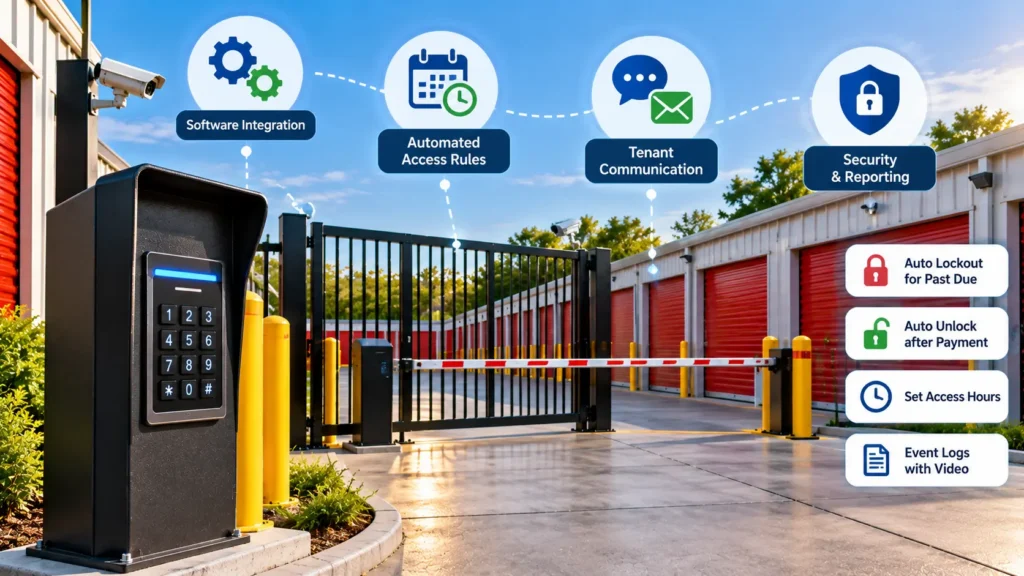
Pick a gate system that connects directly to your platform. Widely used management tools include SiteLink, storEDGE, and Storable. Gate vendors such as PTI Security, Sentinel, OpenTech, and Janus support different pairings, so confirm yours in writing before signing.
Automated Access Rules
- Auto lockout after a grace period you control
- Auto unlock the moment payment clears
- Overlock sync so the gate and unit door follow the same status
- Access hours that match your facility policy
Tenant Communication
Text and email alerts reduce angry calls. A reminder before lockout gives tenants time to pay. A confirmation after payment tells them the gate is ready.
Security and Reporting
- Event logs tied to video surveillance
- Remote gate control for staff
- Battery backup and local code storage during outages
- Anti passback to stop shared codes
Selection Process
Follow these steps in order:
- List your current gate hardware, keypad model, and controller brand.
- Confirm the software connects to your management platform.
- Set your grace period and lockout policy on paper.
- Ask every vendor to show how their Gate Software for Better Tenant Retention features handle a late payment and a same day move in.
- Check support hours, install terms, and contract length.
- Run a pilot at one site before a full rollout.
Pricing and Total Cost
The sticker price tells only part of the story. Compare these cost points side by side:
- Hardware for keypads, controllers, and sensors
- Monthly software fee
- Per unit or per site fees
- Installation and training
- Support and repair terms
Review self storage software pricing for local operators before you request quotes. It helps you spot add on fees early.
Small Facility Setup
Smaller sites can start simple. A single keypad, cloud based software, and online rentals often cover the basics. Touchless rentals and a kiosk let you run with little staff on site.
Read about automation for small self storage facilities under 50 units to plan a budget friendly rollout. Start with the features that stop the most tenant complaints, then add tools as income grows.
Real World Scenarios
Seeing how other sites work makes decisions easier. Review examples of self storage software in action to compare setups.
- Unmanned rural site: Remote control, text alerts, and auto lockout replace a full time manager.
- City multi building site: Access zones keep tenants inside the right building and floor.
- Multi site operator: One dashboard manages codes, reports, and rules across every location.
Mistakes to Avoid
- Buying hardware before checking software support
- Setting lockouts with no grace period
- Skipping staff training on override steps
- Ignoring power and internet outage plans
- Leaving old gate codes active after a tenant moves out
FAQs
What is gate access software for self storage?
It is a system that links your gate keypad to your tenant records. It decides who can enter, when, and under what account status. It also logs every entry.
Does gate software integrate with storage management software?
Yes, most leading gate systems connect to major management platforms. The depth of the connection varies by vendor. Ask for a live demo of your exact pairing.
How do self storage gate codes work?
Each tenant gets a unique PIN tied to their account. The keypad sends the code to the controller, which checks it against the software. If the account is in good standing, the gate opens.
Can gate software lock out tenants who are late?
Yes, you can set automatic lockouts after a grace period. Access returns once payment posts. Many owners add a text reminder before the lockout date.
How much does a self storage gate system cost?
Costs vary by hardware, site size, and software fees. A single keypad site costs far less than a multi building campus. Request itemized quotes so you can compare installation and support charges.
Do tenants need an app to enter the gate?
No, keypad codes still work without an app. Apps give tenants another option, such as opening the gate from a phone. Offering both suits different tenant habits.
Can I run an unmanned facility with gate software?
Yes, many owners run unmanned sites with gate software, online rentals, and remote support. Cameras and event logs help you monitor activity from afar. Plan for outages and have a local contact for urgent repairs.
What happens if the power or internet goes out?
Most controllers store codes locally, so tenants can still enter. Battery backup keeps the gate working during short outages. Confirm this feature before you buy.
Should tenants be able to change their own gate codes?
Yes, but only if your software lets you set rules for length and reuse. Self service changes cut calls to your office. Block simple codes such as 1234 to protect security.
Conclusion
Start with integration, because a gate that talks to your billing system prevents most access errors. Set clear lockout and unlock rules, then add text alerts so tenants know what to expect. Compare total cost, not just monthly fees, and test every vendor with your own scenarios. A short pilot at one site will show problems before they reach every tenant.
Strong entry control protects revenue and builds loyalty at the same time. Choosing Gate Software for Better Tenant Retention gives tenants a fast, predictable way into their units. Your team spends less time on gate calls and more time on rentals and upkeep. Review your current setup this week and list the three entry problems that cost you the most tenants.

Leave a Reply