

Why Do Storage Owners Need a Visual Site Map in Software?
Storage owners need a visual map of the property inside their management platform because it shows every unit, its status, and its rate on one screen. A Site Map in Software turns a long list of unit numbers into a clickable picture of your facility. Managers, tenants, and online renters all see the same real layout instead of guessing. That shared view saves hours each week and keeps your rent roll accurate.
Most facilities still run on lists that hide where the open units really sit. A drive up unit near the office rents differently than a back corner unit on the third floor. A visual layout gives each unit a color, a size, and a spot, so every decision gets faster. The sections below cover how it works, what to require, and how to set it up.
List View vs Visual Site Map
| Task | List or Spreadsheet | Visual Site Map | Owner Benefit |
| Spot vacant units | Scroll and filter rows | One glance, color coded | Quicker rentals |
| Match unit to tenant | Guess by unit number | Click by size, floor, and features | Right unit every time |
| Move in process | Manual lookups | Guided selection | Shorter front desk lines |
| Rate changes | Edit rows one by one | Select groups of units on the map | Faster pricing updates |
| Online reservations | Manual sync | Live sync with the rent roll | Fewer double bookings |
| Staff training | Memorize the layout | Learn by looking | Short onboarding |
| Delinquency checks | Separate report | Past due units flagged by color | Quicker follow up |
| Property audits | Printed lists and a clipboard | Tablet walk through | Cleaner records |
What a Visual Site Map Does
A visual site map is a digital drawing of your facility. Each building, floor, hallway, and unit appears as a block you can click. Colors show if a unit is rented, vacant, reserved, or past due.
Staff stop scanning long lists. They see open units at a glance and match them to the tenant’s needs. This layer sits at the center of modern self storage management software, and every other tool in the platform depends on it.
Platforms from providers like 6Storage build the map directly into daily operations. The unit data, the pricing, and the tenant record all connect to the same block on the screen.
Features to Require
When you compare vendors, look for interactive site map software for local storage facilities that includes these features:
- A drag and drop editor to draw buildings, floors, and units
- Color coded unit status for vacant, rented, reserved, and past due
- A click for unit details such as size, rate, door type, and climate control
- Live sync with online reservations and the rent roll
- Filters by building, floor, size, and unit type
- Tablet and phone access for walk throughs
- Links to gate access and overlock records
Treat this list as a checklist. A tool missing the first four items will create work instead of removing it.
Speed matters as much as features. A site map in software that updates only once a day causes double bookings and angry calls.
Site Map in Software for Better Occupancy
A visual layout makes patterns easy to see. You can spot clusters of empty units, slow floors, and sections that rent fast.
Use those patterns to guide your next steps:
- Vacancy clusters: A row of empty units may point to a pricing or access issue.
- Unit type gaps: Few vacant climate controlled units means you can raise that rate.
- Location value: Ground floor and drive up units near the gate often rent first.
- Hard to rent spots: Units by loading docks or dead ends may need a discount.
These views support a healthy occupancy rate without guesswork. You see the problem on the map, then adjust street rates for that group of units.
Faster Move Ins
Front desk speed shapes the first impression of your business. A map cuts the steps between a tenant’s request and a signed lease.
Here is a typical move in flow:
- The tenant states the size and features they need.
- The manager filters the map by size and unit type.
- The best open unit is selected with one click.
- The lease and payment are completed on the same screen.
- The gate code and unit location are given to the tenant.
Tenants also leave knowing exactly where to go. That means fewer calls and fewer wrong unit mistakes on day one.
Unit Mix and Pricing Control
Your unit mix is the share of each size and type on the property. A map shows that mix in real space, so you can see what you have and what you lack.
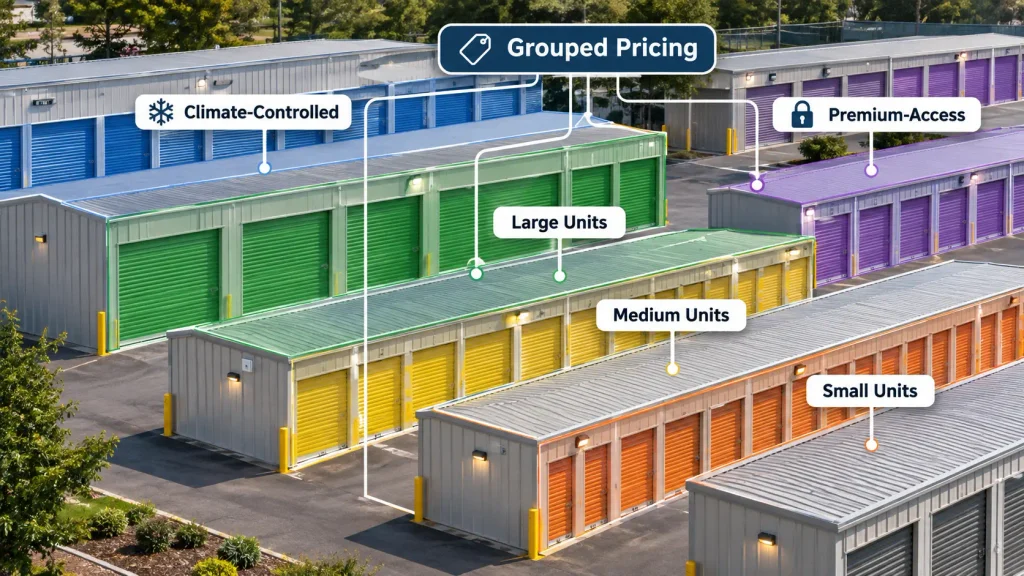
This helps with revenue management too. You can group units by size, floor, or view, then apply rate changes to the whole group. Good software organizes hundreds of units this way without manual sorting.
Budget planning is part of the process. Review self storage software pricing for new owners before you pick a vendor, so the map features match what you can afford.
Planning and Expansion
Mapping helps before you build, not only after. Test different layouts and unit mixes on screen to see what fits the land and the budget.
Start with the cost to open a storage facility and compare it to your projected rent per square foot. A clear layout shows which unit sizes give the best return per building.
Existing owners gain value here too. A map shows where a new building or an added row of units would raise income the most.
Online Rentals and Tenant Self Service
Most renters start their search on a phone. A public facing map lets them choose a unit before they ever call.
That feature supports online reservations and web rentals in three ways:
- Tenants see real availability, not a vague size range.
- Reservations lock the unit so no one else can take it.
- Managers spend less time on phone quotes.
Local search also benefits. A facility with clear unit details and a smooth online flow is easier for a nearby renter to trust and choose.
Setup Steps
Setting up a site map in software takes a few days, not weeks. Follow this order to avoid rework:
- Gather your site plan, building sizes, and current unit list.
- Draw each building and floor in the editor.
- Add every unit with its size, rate, and features.
- Match each unit to its current tenant status.
- Walk the property with a tablet and check for errors.
- Train staff on filters, colors, and the move in flow.
- Turn on online reservations once the data is clean.
Save the walk through for a quiet day. Checking the map against real doors catches mislabeled units early.
Mistakes to Avoid
Some owners lose the value of the map through small errors. Avoid these:
- Skipping the walk through and trusting old unit data
- Using a map that does not sync live with reservations
- Leaving unit features blank, such as power or climate control
- Letting staff edit the layout without approval
- Ignoring the map once the setup is done
A map only works when it matches the property. Review it each month and fix any drift right away.
FAQs
Is a visual site map worth it for a small facility?
Yes, even a small property gains from faster rentals and fewer mix ups. Staff save time on every move in. The setup effort is small when you have a few dozen units.
Does a visual site map work for multi story buildings?
Yes, most platforms let you add floors and switch between them. Each floor shows its own units and colors. Elevators, stairs, and hallways can be added for clarity.
Can tenants see the site map online?
Yes, many systems offer a public unit picker on your website. Renters choose an open unit and reserve it. Managers can limit which units show online.
Does a site map reduce double booked units?
Yes, when it syncs live with reservations and the rent roll. A reserved unit changes color right away. No one else can select it.
Is it hard to build the map?
No, most editors use drag and drop tools and simple templates. Many vendors also help with the first build. Plan on a few days for a mid size property.
Can I show climate controlled units differently?
Yes, you can tag units by type and give each type its own icon or color. This helps staff and renters spot the right unit fast. It also helps you track rates by unit type.
Does the map connect to gate access systems?
Yes, many platforms link to gate and door control. A move in can trigger a code for the right unit. Check the vendor’s list of supported gate brands first.
Do I need CAD drawings to start?
No, a simple site plan or even a hand sketch is enough. You build the layout in the editor from your measurements. CAD files help but are not required.
Will the map work on a phone or tablet?
Yes, most cloud based tools run on any device with a browser. Tablets are useful for audits and walk-throughs. Test the mobile view during your demo.
Conclusion
A site map in software gives owners a faster way to rent, price, and audit every unit. It cuts errors at the front desk and helps tenants book with confidence. The biggest gains come from live sync, clear color codes, and clean unit data. Start with a checklist, test the demo, and walk the property before launch.
The right platform pays for itself through fewer mistakes and better occupancy. Compare vendors that offer digital storage site map software for regional operators and ask for a live demo on your own layout. Check the pricing, the setup time, and the support team. Choose the tool your staff will actually use each day.

Leave a Reply