How does access control integration with self storage software work?
Access control integration connects entry systems like gates, keypads, or mobile access with storage software so everything works together. When a tenant rents a unit, the system gives them access automatically without manual work. It also updates permissions in real time based on payments or account status. This makes storage facilities more secure, fast, and easy to manage.
In a self storage business, handling access manually can create delays and mistakes. Staff may need to assign codes, check payments, and update systems again and again. With access control integration, these tasks happen on their own in the background. This saves time and keeps daily operations smooth.
Customers also get a better experience because they can enter the facility without waiting. They receive access instantly after booking and can use it without confusion. At the same time, managers can track who enters and leaves at any time. This creates a simple and reliable system for both business owners and tenants.
Access Control in Self Storage
Access control is the system that decides who can enter a storage facility or a specific unit. It replaces traditional locks and keys with modern solutions like PIN codes, keycards, mobile apps, or biometric systems. These systems make sure that only authorized tenants can access the property through cloud-based access control solutions for storage facilities, often powered by platforms like 6Storage self storage software. Every access attempt is recorded in the system for better tracking and security.
These systems make sure that only authorized tenants can access the property. They are commonly used at entry gates, elevators, and even individual storage units. Every access attempt is recorded in the system for better tracking. This helps improve both safety and control inside the facility.
Integration Process Explained
The integration connects access control systems with storage management software so they can work together in real time.
Here’s how it works in a simple way:
- A customer rents a unit through the software
- The system automatically creates access credentials (like a PIN or mobile access)
- These credentials are synced with the gate or entry system
- The tenant can instantly enter the facility without manual setup
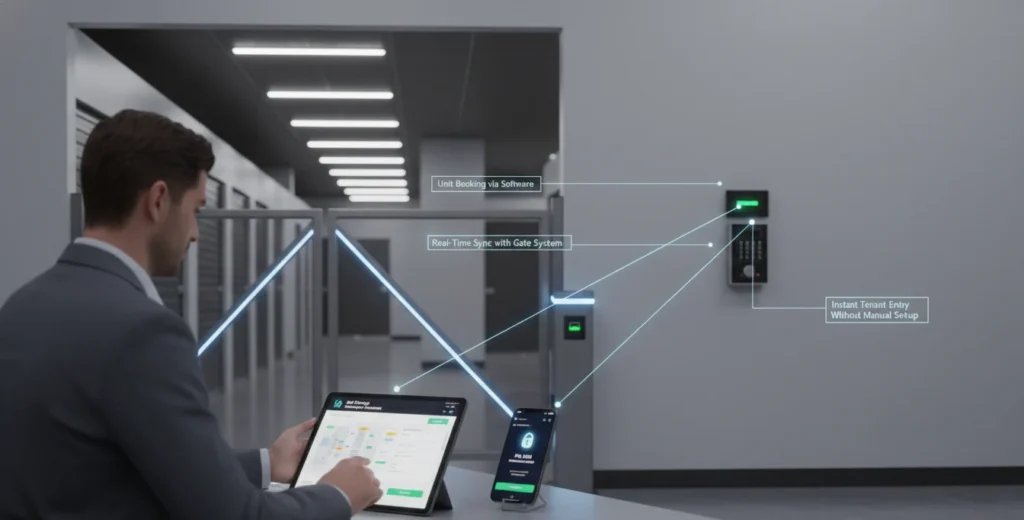
If any changes happen, such as payment delays or account updates, the system automatically adjusts access permissions in real time. This seamless coordination is possible due to tenant protection and automated access security systems, which connect software with access control tools. It reduces manual work and ensures accurate updates without delays.
System Architecture and Connectivity
Integrated systems usually work through cloud technology and APIs (Application Programming Interfaces). These systems help different software tools connect and share information in real time. Data moves automatically between self storage software and access control systems. This setup removes manual work and improves accuracy.
Cloud and API-Based Connection
Cloud technology stores all data online so it can be accessed from anywhere. APIs act like a bridge between two systems and allow them to talk to each other. When a tenant rents a unit, their data is shared instantly with the access system. This makes the whole process fast and reliable without delays.
Real-Time Data Synchronization
When a tenant’s information is updated in the software, the access control system receives that update immediately. This includes changes like new bookings, payments, or cancellations. The system automatically adjusts access permissions based on updated data. This real-time sync helps keep security accurate and up to date at all times.
Key Features of Integrated Systems
Integrated systems come with features that make daily operations easier and faster. They connect access control with storage software so everything works smoothly together. This helps reduce manual tasks and improves overall system performance, especially in setups using access control integration with self storage software.
- Automatic gate and door access
- Real-time updates and syncing
- Remote access control from any device
- Activity logs for tracking entries and exits
- Multi-location management from one dashboard
These features reduce staff workload and improve operational speed. Everything updates automatically, reducing human error. Managers can control access without being physically present, which is supported by storage software features designed for automation and multi-location control.
They also improve the experience for tenants by making entry quick and simple. At the same time, all activity is tracked, which helps keep the facility secure. This makes the system reliable and easy to manage for both staff and customers.
Operational Benefits
Access control integration helps improve daily operations in a simple and effective way. It reduces manual work and connects all systems in one place. This makes the overall workflow faster, smoother, and more reliable.
Improved Efficiency
Integration removes the need for manual work like assigning or removing access. The system handles these tasks automatically in the background. This helps staff focus on more important daily operations.
Better Customer Experience
Tenants can access their units quickly without waiting for staff help. They receive access details instantly after booking. This makes the overall experience smooth and hassle-free.
Time and Cost Savings
Automation reduces repetitive tasks and improves efficiency across daily operations. It also helps businesses scale without increasing manual workload. Many companies now rely on AI automation tools for self storage operations to reduce costs and improve performance.
Security Enhancements
Integrated systems make storage facilities more secure and easy to monitor. They record every access activity in real time for better control. This helps managers stay aware of what is happening at all times.
- Real-time entry and exit tracking
- Instant access control updates
- Detailed activity logs
- Quick response to unusual activity
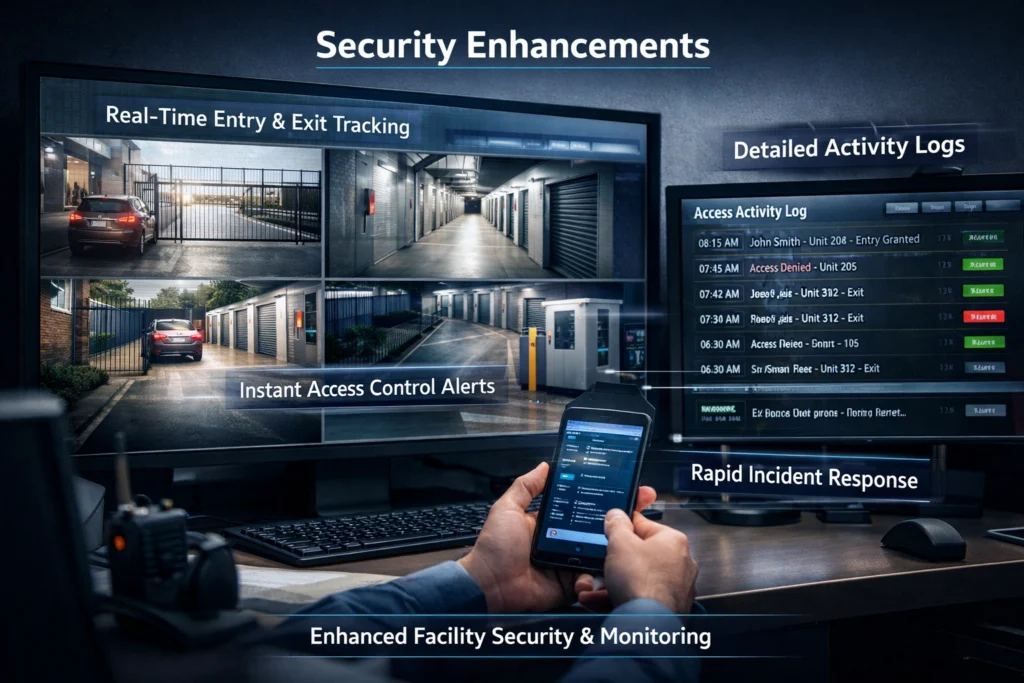
Every entry and exit is stored in the system, which helps in tracking movement inside the facility. If there is any unusual behavior, managers can quickly check the logs and take action. This makes the system more reliable compared to traditional security methods.
Access can also be restricted immediately if needed, such as in case of missed payments or security concerns. This level of control helps prevent unauthorized access. It keeps both the facility and tenant belongings safe at all times.
Common Integration Challenges
While integration offers many benefits, there can be some challenges:
- Compatibility issues between systems
- Dependence on internet connectivity
- Initial setup complexity
- Staff training requirements
However, these challenges can be managed by choosing the right software and ensuring proper setup.
Best Implementation Practices
To get the best results from integration, it is important to follow the right setup steps. A proper approach helps avoid technical issues and improves system performance. It also ensures that everything runs smoothly in the long term, especially when working with access control integration with self storage software.
- Choose software that supports easy integration
- Use cloud-based systems for better flexibility
- Keep systems updated regularly
- Train staff on how to use the platform
- Monitor system performance and access logs
These practices help keep the system stable and efficient over time. Regular updates and monitoring reduce the chances of errors or downtime. Proper staff training also ensures the system is used correctly every day.
Real-World Use Cases
Integration is useful in many everyday situations and makes operations simple. It helps automate tasks that usually take time when done manually. Different features work together to improve both management and customer experience. This makes storage facilities more efficient and easy to control.
Instant Access for New Tenants
New tenants receive access as soon as they complete their booking. The system automatically creates and shares their entry details. There is no need for staff to manually set up access. This makes the move-in process quick and smooth.
Automatic Access Restriction on Missed Payments
If a tenant misses a payment, the system can block access automatically. This happens without any manual action from staff. It helps enforce payment rules in a simple way. This also reduces the need for follow-ups and reminders.
Centralized Control for Multiple Locations
Managers can control multiple storage locations from one system. All access points are connected and updated in real time. There is no need to manage each location separately. This makes operations easier for growing businesses.
Remote Monitoring and Management
Remote monitoring allows managers to control access from anywhere. They can check activity logs and manage permissions without being on-site. This gives better control and flexibility in daily operations. It also helps respond quickly to any issues.
FAQs
What types of access control systems can be integrated with storage software?
Different types of systems can be connected based on the setup and needs. These include keypad entry, RFID cards, mobile app access, and biometric systems like fingerprint scanners. Each option offers a different level of security and convenience. The final choice depends on the software compatibility and facility requirements.
Do tenants need special apps to access the facility?
Not always, because access depends on how the system is set up. Some facilities provide mobile apps for easy entry and control. Others use simple methods like PIN codes or keycards for access. This gives flexibility to both the business and the tenants.
How long does it take to set up an integrated system?
The setup time can vary depending on the system and facility size. Most modern solutions are designed for quick installation and easy setup. If everything is compatible, it can be completed within a few days. Proper planning can also help speed up the process.
Can small storage businesses use integrated systems?
Yes, integrated systems are suitable for both small and large businesses. Many solutions are flexible and can be scaled as the business grows. Small facilities can start with basic features and upgrade later. This makes it a cost-effective option for all business sizes.
What happens if the system goes offline?
Most systems are designed with backup options to handle such situations. They may use offline access codes or store data locally for temporary use. This ensures that tenants can still enter the facility without major issues. Once the system is back online, everything syncs automatically.
Conclusion
Access control integration with self storage software is now a key part of running a modern storage business. It connects systems in a way that saves time and reduces manual work. This setup improves security and makes daily operations much easier to manage.
Tenants also get a better experience because access is quick and simple. Businesses can also follow industry standards from the Self Storage Association to improve their systems further. Overall, it helps storage facilities stay efficient, secure, and competitive.

Leave a Reply