
How to choose essential features for self-storage online rentals?
Choosing the right features for a self-storage website is important for smooth online rentals. A good website should allow customers to search units, check availability, and book storage spaces easily. The main goal is to make the rental process fast, simple, and clear so users can complete everything without confusion.
The demand for self-storage online rentals is growing quickly because people now prefer online booking instead of visiting in person. Customers want quick access to information, clear pricing, and easy payment options. If a website is slow or confusing, users usually leave and choose another service.
A well-built storage website helps both customers and business owners. It saves time, reduces manual work, and improves customer satisfaction. When everything is easy to use, people trust the service more and are more likely to complete their booking.
Comparison of Essential Features for Self-Storage Websites
| Feature | Purpose | Why It Matters |
| Online Booking System | Allows users to reserve storage units online | Makes the rental process fast and simple |
| Real-Time Availability | Shows updated unit status | Prevents confusion and double bookings |
| Transparent Pricing | Displays clear rental costs | Builds trust and reduces drop-offs |
| Secure Payments | Enables safe online transactions | Increases customer confidence |
| Mobile-Friendly Design | Optimizes website for mobile users | Improves user experience on all devices |
| Location Search | Helps find nearby storage units | Saves time and improves convenience |
| User Dashboard | Manages bookings and payments | Gives users full control of their account |
| Security Features | Protects customer data | Builds trust and ensures safety |
Why Choosing the Right Features Matters
A self-storage website is directly connected to your business growth. It is not only about design, it is about how easily users can complete a booking.
Many businesses follow professional standards like self-storage website design best practices to improve usability and conversions.
When features are properly planned, they help you:
- Reduce customer confusion
- Improve booking speed
- Increase trust in your service
- Reduce manual workload for your team
- Convert more visitors into paying customers
On the other hand, missing or poorly designed features can lead to abandoned bookings and lost revenue.
Understand Your Customer First
Before selecting features, you need to understand your customers’ behavior. Most people looking for storage units want three things:
- Quick access to available units
- Clear pricing without hidden steps
- Easy and fast booking process

If your website fails to deliver these, users will leave quickly. So every feature should support simplicity and clarity.
Essential Features for Self-Storage Online Rentals
A self-storage website should be built in a way that makes renting simple and fast for every user. The goal is to remove confusion and allow customers to complete everything online without extra effort. A well-planned system also improves trust and increases bookings.
For a complete understanding of building structured systems, platforms like modern website design solutions show how design impacts user behavior.
1. Online Booking System
This is the most important feature of your website. A strong booking system allows users to select a storage unit, check availability, and reserve it instantly.
A good booking system should:
- Show available units in real time
- Allow instant reservation
- Reduce unnecessary steps
- Work smoothly without technical issues
If customers need to call or wait for confirmation, they may lose interest and move to another provider.
2. Real-Time Unit Availability
Customers should always know what is available at the moment they visit your website.
This feature should:
- Update automatically when a unit is booked
- Show clear size and type of units
- Avoid overbooking issues
Real-time availability builds trust and saves time for both customers and staff.
3. Transparent Pricing Display
One of the biggest reasons users leave a website is unclear pricing.
Your website should clearly show:
- Monthly rental price
- Different unit sizes and their cost
- Any additional fees (if applicable)
When pricing is simple and visible, customers feel more confident to book.
4. Secure Online Payment System
A self-storage website must support safe and smooth online payments.
Security also plays a major role in building trust. Many platforms focus on tenant protection and secure systems to improve customer confidence during online transactions.
A good payment system should:
- Support multiple payment methods
- Protect customer data
- Complete transactions quickly
- Send instant confirmation receipts
When customers trust your payment system, they are more likely to complete the booking.
5. User Account Dashboard
A customer dashboard improves the overall experience after booking.
You can also explore how professional systems like storage platform solutions integrate dashboards for better management.
It should allow users to:
- View active rentals
- Check payment history
- Update personal information
- Renew or manage bookings
This feature reduces the need for customer support calls and makes the process more self-service friendly.
6. Mobile-Friendly Experience
Most users browse storage websites on mobile devices. If your site is not mobile-friendly, you are losing a large number of potential customers.
A mobile-optimized website should:
- Load quickly on phones
- Be easy to navigate
- Have simple booking buttons
- Display content clearly on small screens
A smooth mobile experience directly improves conversion rates.
7. Location-Based Search
Customers usually look for storage units near their home or office.
This feature should:
- Allow users to search by location
- Show nearby storage facilities
- Integrate map views for easier navigation
This makes it easier for users to find the right unit without confusion.
8. Strong Security Features
Security is very important when dealing with customer data and online payments.
Your website should include:
- SSL encryption
- Secure login system
- Safe payment gateway
- Data protection measures
When users feel safe, they are more likely to trust your platform.
9. Easy Contact and Support Options
Even with a strong website, some users may need help.
Make sure your website includes:
- Live chat or contact form
- Phone number visibility
- Quick response system
Fast support improves customer satisfaction and builds long-term trust.
10. Simple and Clean User Interface
A confusing website design can reduce bookings even if your services are good.
Your website should:
- Be easy to navigate
- Avoid unnecessary clutter
- Use clear buttons and labels
- Guide users step-by-step
A clean interface helps users complete their booking without stress.
How These Features Improve Online Rentals
A well-structured self-storage website makes the entire rental journey easier for customers from start to finish. When users find everything in one place without confusion, they are more likely to complete their booking instead of leaving the site.
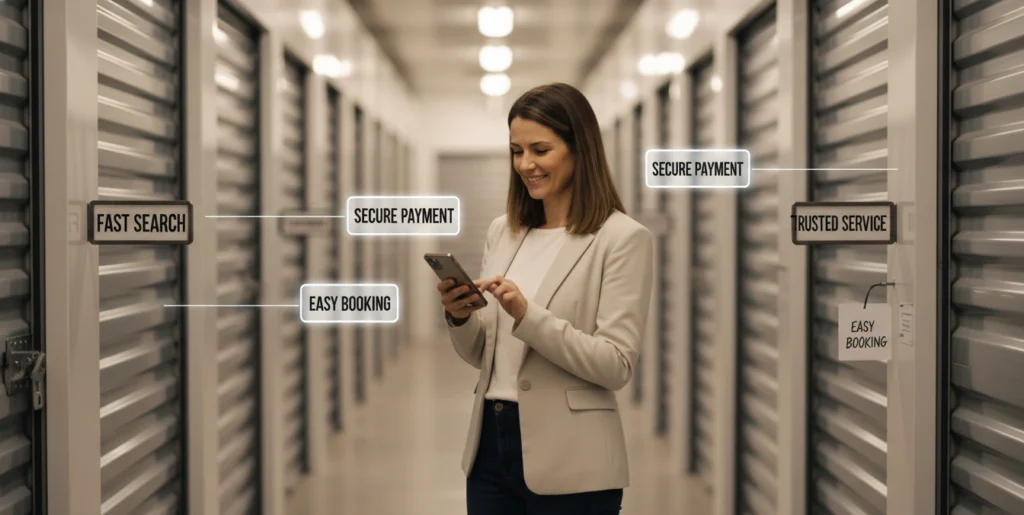
When all these features work together, they create a smooth rental experience.
Here is what happens:
- Users find information quickly
- Booking becomes simple and fast
- Payment is completed without issues
- Customers feel confident in your service
This leads to more completed bookings and fewer abandoned sessions.
Common Mistakes to Avoid
Many self-storage websites lose potential customers because of small but critical mistakes. These issues usually look minor but have a big impact on user experience and conversions. Fixing them can instantly improve performance and booking rates.
Some of the most common issues include:
- Complicated booking forms
- No real-time availability updates
- Hidden pricing details
- Poor mobile experience
- Slow loading speed
These problems directly affect how users interact with your website. If the booking process feels difficult or confusing, users will simply leave and choose another service. A smooth and simple experience is always more effective for conversions.
Slow websites and unclear pricing are also major trust breakers in self-storage online rentals. Customers expect quick access to information, and any delay reduces their confidence in your service. Improving these areas helps create a more reliable and professional platform.
Best Way to Choose the Right Features
Choosing the right features should always be based on user needs, not just adding everything at once. A focused and step-by-step approach works better because it keeps your website simple, stable, and user-friendly. It also helps you avoid unnecessary complexity in the beginning.
A good approach is:
- Start with booking and payment system
- Add real-time availability
- Improve mobile experience
- Then add advanced features like dashboards and location search
This step-by-step method ensures your website grows in a structured way. You first build the core system that handles bookings and payments smoothly. Once that is stable, you improve visibility and usability with real-time data and mobile optimization.
After that, you can slowly introduce advanced features like dashboards and location-based search. This approach not only improves performance but also ensures a better user experience from day one.
FAQs
What features should a self-storage website include for online rentals?
A self-storage website should include online booking, real-time availability, secure payment options, and a user dashboard. These features make the rental process simple, fast, and user-friendly. They also help customers complete bookings without needing manual assistance.
Why is real-time availability important for storage websites?
Real-time availability ensures customers always see updated information about available storage units. It prevents double bookings and confusion. This feature also helps users make faster decisions, improving overall booking efficiency.
How does online payment improve the customer experience?
Online payment allows customers to complete transactions quickly and securely. It removes the need for manual payment methods and saves time. It also builds trust because users receive instant confirmation after payment.
Is a mobile-friendly design necessary for self-storage websites?
Yes, it is very important because most users search for storage services on mobile devices. A mobile-friendly design ensures smooth navigation, easy booking, and better user experience across all screen sizes.
What role does a user dashboard play in self-storage websites?
A user dashboard helps customers manage their bookings, payments, and account details in one place. It improves convenience and reduces the need to contact customer support for small tasks.
Conclusion
Choosing the right features for a self-storage website is not just a technical decision, it directly impacts business growth and customer trust. A simple and well-structured system makes it easier for users to search, book, and pay without confusion. This smooth experience helps increase conversions and long-term customer satisfaction.
Many real-world discussions on platforms like storage industry discussions also highlight that users prefer fast booking systems, clear pricing, and reliable online access. When a website is designed properly for self-storage online rentals, it naturally performs better because customers can complete their journey without delays or confusion. In today’s digital environment, simplicity and trust are the key to success.

Leave a Reply