

How to Run a Self Storage Business Without On-Site Staff?
You can run a self storage business without on-site staff by combining cloud-based management software, remote access control, and automated payment systems. This model, often called unmanned or unstaffed self storage, cuts labor costs while keeping tenants served 24/7 through app-based tools. Facility owners across the USA are switching to this setup because it lowers overhead without hurting occupancy. Learning how to run a self storage business this way starts with picking the right technology stack.
Renters today expect instant, app-based service: rent a unit, pay rent, get an access code, without waiting for an office to open. Unstaffed and hybrid-staffed facilities are one of the fastest-growing operating models in the self-storage sector as this expectation becomes the norm. The rest of this guide covers exactly what tools and steps make unstaffed operations work.
Can a self storage facility run with zero on-site staff?
Yes, facilities can operate remotely using cloud software, smart locks, and automated billing. Most owners still keep a phone or chat line staffed by a remote team, just not a person physically at the property.
Key points:
- Cutting a full-time on-site manager typically saves the equivalent of that role’s full salary and benefits, commonly cited in industry discussions as roughly $30,000–$45,000/year depending on market and role scope
- Cloud software can handle the large majority of routine front-desk tasks: billing, gate codes, lease signing, notices
- Smart access control and remote cameras replace most of what a guard would monitor
- A well-built move-in flow lets most tenants complete signup online in well under 15 minutes
Staffed vs. Unstaffed Self Storage
| Factor | Traditional Staffed Model | Remote/Unstaffed Model |
| Labor cost | ~$30,000–$45,000/year per manager (salary + benefits) | Software subscription cost, typically a small fraction of that |
| Office hours | Limited (e.g. 9 AM–6 PM) | 24/7 tenant access |
| Move-in process | In-person paperwork | Fully online, self-service |
| Payment collection | Manual or check-based | Automated recurring billing |
| Security monitoring | Human patrol | Smart locks, cameras, automated alerts |
| Scalability | Hard to manage multiple sites | One dashboard can oversee several locations |
Why Owners Are Dropping On-Site Staff
Payroll eats into margins fast, a single manager’s salary can equal months of net income for a small facility. Beyond raw cost, remote-ready facilities avoid recurring headaches: sick days, turnover, hiring, and training a new manager every time one leaves.
What’s pushing owners toward the unstaffed model:
- Rising minimum wage costs in many states
- Difficulty finding and retaining reliable on-site managers
- Renter demand for contactless, app-based rentals
- The need to manage several facilities without hiring a full team per site
Owners running three or more facilities tend to see the largest relative labor savings, since one remote team can support every location from a single dashboard instead of staffing each site separately.
Core Systems You Need Before Going Unstaffed
Switching away from on-site staff isn’t just closing the office door, you need digital infrastructure that replaces every task a human manager used to handle.
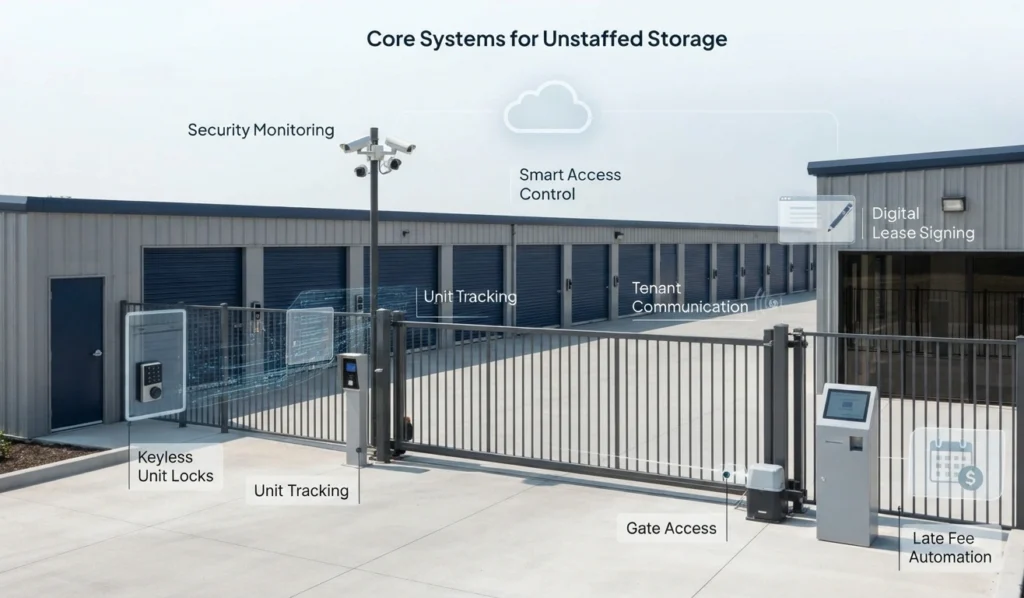
Cloud-Based Management Software
This is the backbone of remote operations. It handles billing, unit tracking, lease signing, and tenant communication from one dashboard, syncing rent collection, gate access, and reporting so nothing falls through the cracks. Look for a cloud storage facility management software near you built specifically for self-storage rather than generic property management tools, self storage has unique needs around unit-level access control, lien timelines, and auction workflows that general property tools don’t handle well.
Smart Access Control
Renters need a way into the gate, hallway, or their unit without a key or a person handing one over. A cloud-based access control system assigns unique codes or mobile credentials per tenant and logs every entry and exit automatically, creating a security trail without a guard on duty.
Automated Billing and Late Fee Handling
Recurring payments should run without anyone pressing a button. Auto-pay setups reduce missed payments and cut down on collection calls. Late fees, notices, and lien processes can also be automated through the right platform, keeping cash flow steady even when no one is physically present.
How to Run a Self Storage Business With Remote Tools
- Audit your current manual processes. List every task your on-site staff currently handles, from tours to lien sales.
- Choose a management platform built for self-storage, not generic property management tools.
- Install smart locks and gate systems that sync in real time with your software.
- Set up automated billing so rent, late fees, and deposits run without manual entry.
- Create a remote customer support channel, chat, phone forwarding, or a call center.
- Add security cameras with remote monitoring covering gates, hallways, and unit rows.
- Test the tenant move-in flow yourself. Rent a unit as a test customer before real renters do, and fix any friction points you find.
Security Without a Guard on Duty
Security is the biggest worry that stops owners from going unstaffed, but modern access tech closes most of the gaps a human guard used to cover. Cloud-based access control can lock down individual units, track every gate entry, and send alerts the moment something looks off, giving owners real-time visibility from a different city or state.
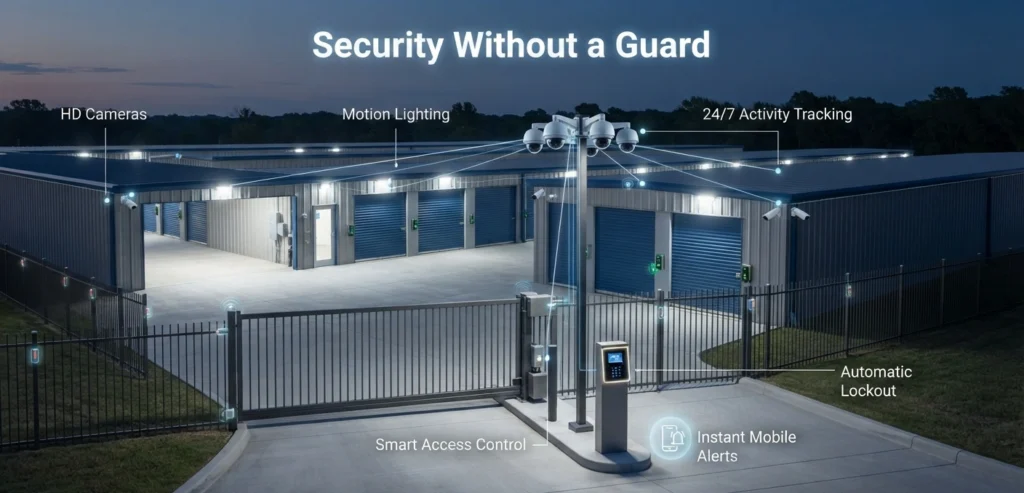
Pair access control with:
- Motion-activated lighting across the property
- HD cameras at every entry point and hallway
- Instant mobile alerts for break-in attempts
- Automatic lockout for accounts with unpaid balances
Facilities that pair cameras with instant mobile alerts are generally able to catch break-in attempts within minutes rather than hours, since the owner is notified the moment a sensor triggers rather than waiting for a scheduled patrol.
Protecting Tenants and Reducing Liability
Unstaffed facilities still need to protect what customers store. Without a manager walking the halls, digital safeguards carry more weight. Offering a tenant protection option directly through your leasing software, letting renters opt into coverage during checkout, reduces disputes over damaged or stolen items and creates an added revenue line for the owner. Note: any protection plan offered through your own software should be disclosed clearly to renters as optional coverage, separate from the facility’s own property insurance.
Storage insurance disputes are a recurring complaint in owner communities, and a protection plan built into the rental flow prevents most of that friction before it starts.
Handling Customer Service Remotely
Tenants still need help sometimes, even without a front desk. Route it through channels that don’t require a physical body on-site:
- Live chat on your booking site for quick questions
- Call forwarding to a virtual assistant or answering service
- FAQ pages covering gate codes, payment issues, and unit sizes
- Video call support for move-in walkthroughs when needed
Most tenant questions are repetitive, gate codes, billing dates, unit access, so a solid FAQ and chatbot setup can resolve the majority of contacts without a human on the line.
Common Mistakes When Going Unstaffed
- Rushing the switch without testing software first
- Ignoring cellular or WiFi dead zones that break smart locks
- Skipping tenant communication about the change
- Forgetting a backup plan for power or internet outages
- Not setting clear rules for after-hours emergencies
Is Unstaffed Self Storage Right for Every Facility?
Smaller facilities, generally under 300 units, tend to see the fastest payoff from going unstaffed, since the labor savings represent a larger share of the site’s overall cost base. Larger multi-building sites may still need a part-time on-call presence for emergencies or busy walk-in traffic.
Rural locations with weak internet coverage face bigger hurdles with cloud-based systems, since gate access, payments, and monitoring all depend on a stable connection. Urban and suburban facilities with strong connectivity typically see smoother transitions.
FAQs
Is it legal to run a self storage facility without on-site staff?
Yes, unstaffed self storage is legal in all 50 states. Zoning laws vary by city, so check local regulations before removing on-site staff entirely.
How much money can I save by going unstaffed?
Savings roughly track the cost of the on-site role you’re removing, commonly in the $30,000–$45,000/year range per facility once salary and benefits are counted. Software subscription costs are usually a small fraction of that.
What happens if a tenant gets locked out after hours?
Most cloud access systems let tenants reset their own codes through a mobile app. A backup phone support line handles cases the app doesn’t resolve.
Do I still need insurance if my facility is unstaffed?
Yes, facility insurance is required regardless of staffing. Tenant protection plans are separate and cover renter belongings, not the property itself.
Can one person manage multiple unstaffed facilities remotely?
Ye, cloud dashboards let one owner or manager oversee several locations from a single login, which is one of the main reasons multi-site owners adopt remote management.
What internet backup should unstaffed facilities have?
A cellular failover router keeps gate access and payment systems running during WiFi outages, preventing lockouts and lost transactions during downtime.
How do tenants move in without meeting anyone in person?
Renters sign leases, pay deposits, and receive access codes online through the management portal, usually in well under 15 minutes from booking to gate access.
Will removing on-site staff hurt my Google reviews?
Not if remote support is fast and reliable. Unstaffed facilities that keep response times to a few hours or less on tenant issues tend to maintain strong review scores.
What’s the biggest risk of going fully unstaffed too fast?
Skipping a testing phase. Running a trial period with a small group of units first catches most technical and security issues before they affect your full tenant base.
Conclusion
Learning how to run a self storage business without on-site staff comes down to replacing human tasks with reliable digital systems: cloud software, smart locks, automated billing, and remote support cover most of what a front desk used to handle. Start with one facility before rolling the model out across multiple properties, so you can catch friction points with limited downside.

Leave a Reply