
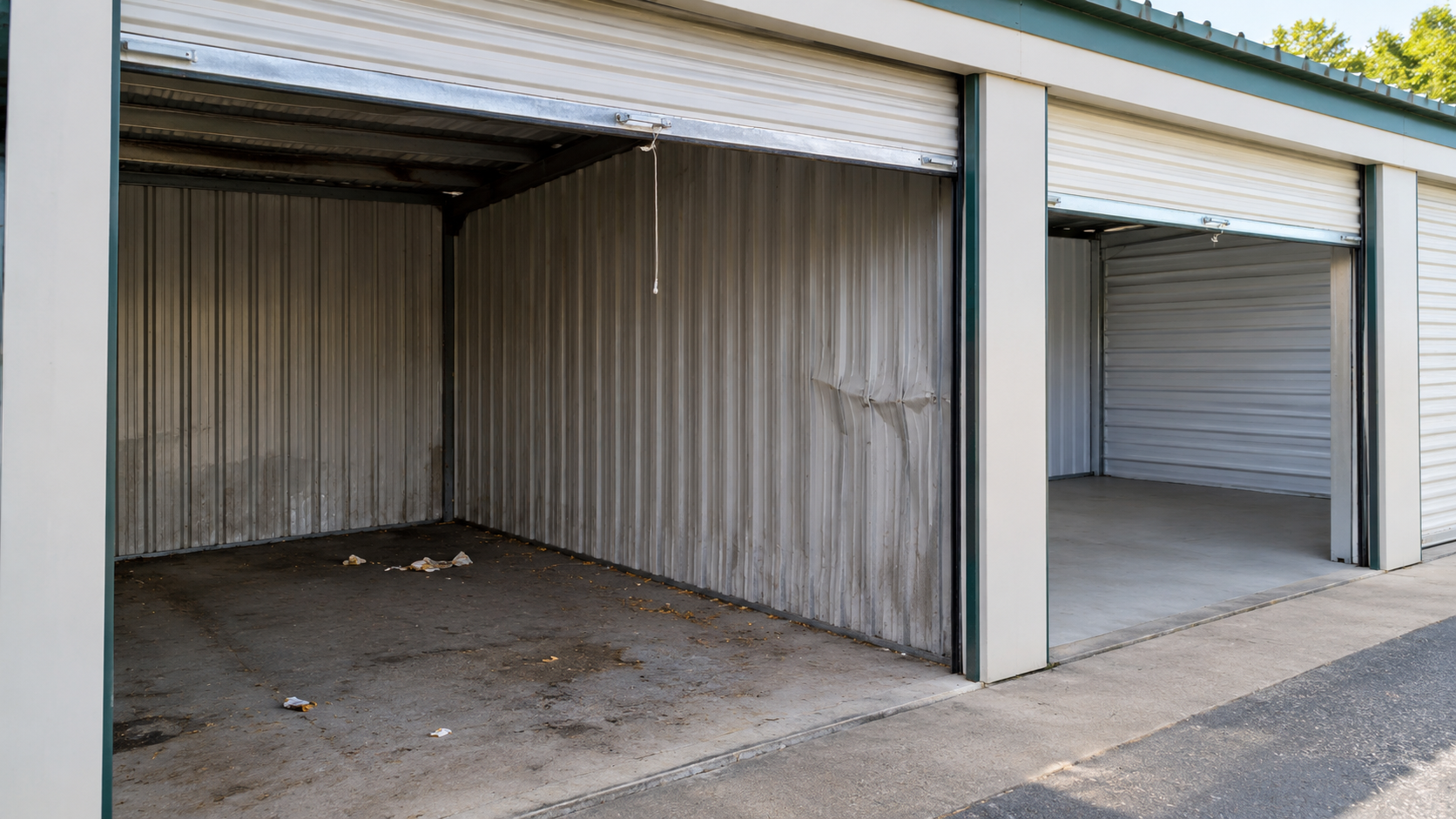
How Can Software Flag Damaged or Dirty Units After Move-Out?
Self storage management software can flag Damaged or Dirty Units after a tenant leaves by recording inspection results, updating unit availability, and assigning cleaning or repair tasks through supported workflows. Managers can use digital inspection records to document property conditions before approving units for new rentals. This prevents customers from booking spaces that require maintenance. It also helps facility operators maintain consistent rental standards.
Managing unit conditions becomes increasingly difficult when a storage facility experiences frequent tenant turnover. Paper checklists and manual spreadsheets can leave maintenance issues unresolved or overlooked. A centralized management system helps operators coordinate inspections, track maintenance responsibilities, and monitor rental readiness. Connecting these activities creates a controlled process for returning vacant storage units to available inventory.
Unit Condition and Rental Readiness Matrix
Facility managers can adopt the following inspection matrix to determine which units require attention before entering available rental inventory.
| Unit Condition | Recommended Status | Required Action | Ready to Rent |
| Clean and empty | Available | Approve inspection | Yes |
| Dust and minor debris | Cleaning required | Assign housekeeping | No |
| Damaged door or lock | Maintenance required | Repair security components | No |
| Water leakage | Unavailable | Identify and repair moisture source | No |
| Pest activity | Treatment required | Arrange professional pest control | No |
| Abandoned belongings | Inspection hold | Follow legal disposal procedures | No |
| Structural damage | Out of service | Arrange professional assessment | No |
| Repairs completed | Pending approval | Conduct final inspection | After approval |
These recommended classifications help managers distinguish physical vacancy from actual rental readiness. Status names and automation capabilities may vary between storage management platforms.
Software Workflow for Damaged or Dirty Units
A structured unit turnover process connects tenant departures with facility maintenance and inventory management. Instead of treating every vacant space as rentable, managers establish inspection requirements before accepting new reservations.
Recording Tenant Departures
The process begins when a tenant schedules or completes a move out. Storage rental software maintains departure dates, tenant records, final billing information, and unit identification details.
Facility managers should establish a separate inspection requirement alongside this process to confirm the physical condition of each space.
Creating Digital Inspection Checklists
A standardized storage unit inspection checklist helps employees assess every property using consistent criteria.
The checklist should cover:
- Floor cleanliness and surface damage.
- Door tracks, hinges, and locking mechanisms.
- Wall dents, cracks, and holes.
- Ceiling leaks and moisture buildup.
- Pest activity and unusual odors.
- Abandoned furniture, boxes, or waste.
- Ventilation and climate control performance.
Recording these conditions digitally creates an organized inspection history that employees can reference during maintenance reviews.
Assigning Unit Condition Flags
After completing an inspection, employees should classify the unit according to the severity of the issue. A minor cleaning requirement should receive a different classification from a broken security door or damaged ceiling.
Storage operators managing Damaged or Dirty Units across local facilities can use centralized inventory management to coordinate unit availability and tenant turnover.
When supported by the software configuration, inspection outcomes can also trigger maintenance notifications or task assignments.
Visual Site Maps for Unit Monitoring
A visual facility map gives managers a practical way to identify unavailable spaces without reviewing individual rental records.
6Storage provides a color coded sitemap that displays units based on operational status. Its default colors include green for vacant units, grey for unavailable spaces, orange for scheduled departures, and dark blue for reserved units.
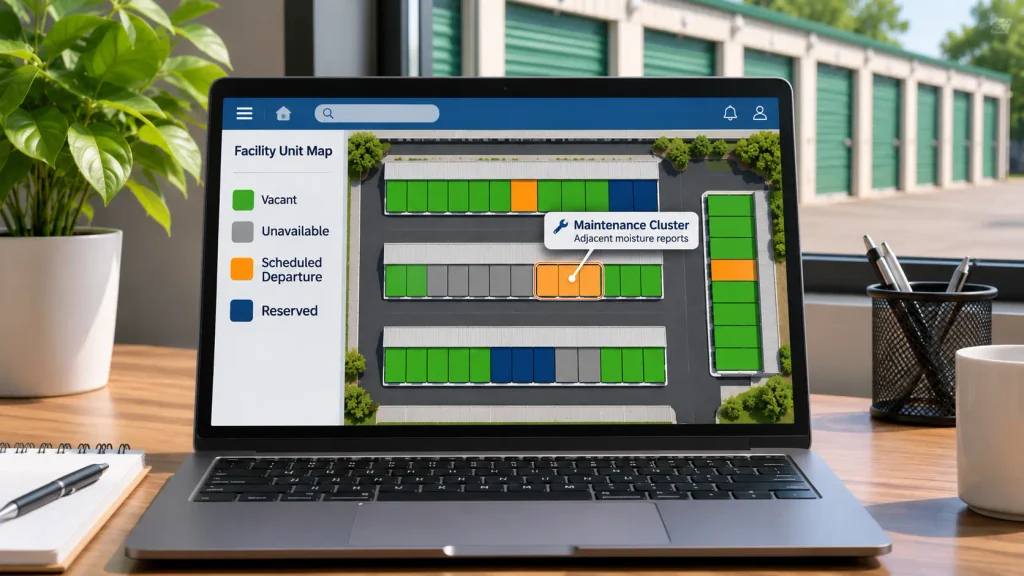
Managers can use a visual site map in storage management software to locate affected units and coordinate inspections throughout the property.
Identifying Maintenance Clusters
When several neighboring units experience similar problems, their physical location can help managers investigate a shared cause.
For example, moisture reported in three adjacent units could indicate a drainage or roofing problem rather than separate tenant related incidents.
Mapping these issues helps operators determine whether an individual repair or a wider facility maintenance project is necessary.
Maintenance Task Management and Staff Accountability
Recording a defect is only the beginning of effective storage facility maintenance. Every reported issue needs a responsible employee, a completion deadline, and a clear resolution requirement.
A maintenance work order should contain the following information:
| Work Order Field | Purpose |
| Facility location | Identifies the affected property |
| Unit number | Connects the task to inventory |
| Problem description | Documents the reported condition |
| Priority level | Determines response urgency |
| Assigned employee | Establishes responsibility |
| Completion deadline | Supports maintenance scheduling |
| Repair cost | Records operational expenses |
| Approval status | Confirms final inspection |
Where dedicated maintenance task management is unavailable within the rental system, operators can maintain a connected work order register.
Prioritizing Maintenance Requests
Not every maintenance issue requires an immediate response. A priority system allows employees to address serious conditions before routine housekeeping.
- Critical: Electrical hazards, structural defects, or active water intrusion.
- High: Broken doors, damaged locks, or suspected pest activity.
- Medium: Minor wall damage or deteriorating door seals.
- Routine: Dust removal, sweeping, and cosmetic cleaning.
Managers should establish response deadlines based on safety risks, repair complexity, and upcoming reservations.
Preventing Premature Online Reservations
An empty storage unit should not automatically become available for online booking. If a customer reserves a space with unresolved maintenance problems, the facility may need to arrange an alternative unit, issue a refund, or delay the rental.
6Storage allows operators to control the online visibility of vacant units through its unit management settings. This gives staff control over which spaces appear on the rental website.
Facility managers should check availability across their rental website, reservation system, and administrative dashboard before releasing a repaired unit.
Digital Condition Records and Damage Evidence
Documenting unit conditions helps facility operators maintain accurate records and assess responsibility for property damage.
When employees encounter Damaged or Dirty Units, they should capture dated photographs and record inspection observations against the corresponding unit number.
A complete condition record should include:
- Photographs taken before cleaning or repairs.
- Previous inspection records.
- Tenant departure date.
- Description of the affected area.
- Estimated repair or cleaning expenses.
- Contractor invoices and completion evidence.
These records support maintenance budgeting, internal audits, and the review of disputed charges.
Cleaning Fees and Security Deposits
Facility managers should review the rental agreement and applicable local laws before charging former tenants for cleaning or repairs.
6Storage supports recording additional charges and departure notes during the tenant move out process. Its unit management settings also support security deposit configurations.
Employees should distinguish ordinary wear from tenant related damage before applying any charges.
Centralized Maintenance Across Multiple Facilities
Storage businesses operating across several cities or counties need consistent inspection procedures. Independent records at each location can make it difficult for regional managers to evaluate maintenance performance.
Centralized storage facility management allows operators to review inventory by property, unit size, category, and availability.
Businesses managing large portfolios can benefit from understanding how self storage software organizes hundreds of units.
Regional Maintenance Planning
Environmental conditions influence the types of maintenance that storage properties require.
| Facility Environment | Common Inspection Concerns |
| Coastal regions | Corrosion and humidity |
| Southern states | Heat, moisture, and pests |
| Northern states | Freezing conditions and door seal deterioration |
| Urban storage facilities | Heavy usage and frequent tenant turnover |
| Outdoor storage properties | Dust, drainage, and weather exposure |
Operators should adapt inspection schedules to local climate conditions, building designs, and property maintenance requirements.
Financial Impact of Unavailable Storage Units
A unit undergoing maintenance cannot generate new rental income until it becomes suitable for occupancy. Extended repair delays can therefore affect revenue potential and inventory performance.
Managers can estimate potential rental revenue exposure using this formula:
Potential rental revenue exposure = Monthly rental rate ÷ Days in billing month × Unavailable days
For example, consider a storage facility with five unavailable units, each renting for $150 per month.
| Revenue Metric | Example Calculation |
| Monthly rent per unit | $150 |
| Daily rental value | $150 ÷ 30 = $5 |
| Unavailable period | 10 days |
| Potential revenue exposure per unit | $50 |
| Total affected units | 5 |
| Total potential revenue exposure | $250 |
This illustrative calculation assumes a 30 day billing month and immediate rental demand. Actual lost revenue depends on occupancy, customer demand, and alternative unit availability.
Owners developing maintenance budgets should also consider the cost of opening a storage facility when planning operating reserves and long term property expenses.
Maintenance Performance Reporting
Storage operators should measure how efficiently their teams return unavailable units to rentable inventory.
The following key performance indicators can support monthly operational reviews.
| Performance Indicator | Calculation |
| Average unit turnaround time | Total turnaround hours ÷ Completed turnovers |
| Inspection failure rate | Failed inspections ÷ Total inspections × 100 |
| Maintenance backlog | Total unresolved maintenance tasks |
| Unavailable inventory rate | Unavailable units ÷ Total units × 100 |
| Average repair cost | Total repair expenses ÷ Repaired units |
| Inspection completion rate | Completed inspections ÷ Required inspections × 100 |
Tracking these indicators helps managers identify recurring defects, staffing shortages, and inefficient repair procedures.
Final Inspection and Rental Approval
A completed maintenance task should not automatically serve as proof that a storage unit is ready for occupancy. A designated employee should verify the finished work before authorizing its release.
The final approval process should follow these steps:
- Review the original inspection findings.
- Confirm that all reported defects have been resolved.
- Test doors, locks, and relevant security components.
- Verify that the interior is clean and dry.
- Record the inspection approval date.
- Restore rental availability and website visibility.
This approval procedure establishes a clear quality control standard before the next customer receives access.
Choosing the Right Storage Management Software
Facility owners should evaluate storage management systems based on their ability to support inventory accuracy and operational coordination.
Essential capabilities to assess include:
- Centralized unit inventory management.
- Editable unit condition records.
- Interactive facility maps.
- Online rental availability controls.
- Tenant history and departure documentation.
- Multiple property management.
- Staff access permissions.
- Reporting and integration capabilities.
6Storage combines rental management, unit inventory controls, visual site maps, payment processing, and third party integrations within its storage management platform.
Before selecting a platform, operators should request a demonstration of their specific inspection and maintenance workflow to verify that it meets their operational requirements.
FAQs
Can tenants submit photographs when vacating a storage unit?
Yes, facilities can request photographs showing the condition of an empty unit at departure. However, tenant submitted evidence should not replace an independent inspection when damage, contamination, or security concerns exist.
What happens if a tenant leaves belongings inside a storage unit?
Facility operators should follow their rental agreement and applicable abandoned property laws before removing possessions. Written communication and documented authorization can help reduce disputes concerning disposal.
Can storage software detect physical damage automatically?
Standard storage management software cannot independently identify physical damage without inspection data or compatible detection technology. Connected sensors may report environmental problems, but employees must still assess physical defects.
Can managers charge tenants for excessive storage unit cleaning?
Yes, when the rental agreement and applicable laws permit such charges. Managers should retain supporting evidence and itemized expense records before applying a cleaning fee.
How should staff handle mold inside a vacant storage unit?
Staff should restrict access and arrange an appropriate assessment of the moisture source and affected materials. Significant contamination may require professional remediation before the unit can safely return to service.
Can employees inspect storage units without internet access?
Yes, if their inspection application supports offline data collection. Facilities with unreliable connectivity should confirm that inspection records synchronize correctly when internet access returns.
Should storage unit inspections cover outdoor parking spaces?
Yes, outdoor parking inspections should cover surface damage, fluid spills, drainage problems, abandoned property, and damaged access barriers. Inspection requirements should reflect the type of vehicle storage offered.
Can a storage facility track recurring pest problems through software?
Yes, managers can maintain pest incident records by unit number, treatment date, and affected building. Reviewing these records can help identify recurring activity and coordinate preventive treatment with qualified pest control providers.
What should managers do if a former tenant leaves a lock on the unit?
Managers should verify the tenant’s departure status and review the rental agreement before removing the lock. An inaccessible unit should not be treated as confirmed vacant until staff establish lawful access and verify its condition.
Conclusion
Managing Damaged or Dirty Units through a centralized storage management system helps local facility operators maintain accurate rental inventory and organized maintenance records. A defined inspection procedure establishes clear standards for cleaning, repairs, and rental approval. Assigning responsibilities ensures that employees understand which issues require attention. Measuring turnaround performance helps managers identify operational delays that could affect revenue.
Facility owners should establish consistent condition classifications and maintenance approval procedures across every property. Accurate documentation supports informed decisions about repair expenses and tenant responsibilities. Selecting software with reliable inventory controls creates a stronger foundation for daily facility operations. Book a demo with 6Storage to assess how its management tools can support your facility’s inspection and unit turnover requirements.

Leave a Reply