

How to Manage Storage Units and Tenants via Dashboard?
Managing storage units and tenants through a dashboard means using one login screen to track unit availability, rent payments, gate access, and tenant records in real time. This guide shows facility owners exactly how to manage storage units without juggling spreadsheets or paper files. If you run a self-storage business and want less stress, a digital dashboard is the fastest way to gain control of your daily operations.
Self-storage owners lose hours every week to manual check-ins, late payment tracking, and unit status confusion. A dashboard fixes this by pulling every task into one screen. Below, we break down the exact steps, tools, and comparisons you need to run a tighter, more profitable facility.
Manual vs. Dashboard Management
| Task | Manual Method | Dashboard Method |
| Unit availability tracking | Paper charts or Excel | Live visual map, updated instantly |
| Rent collection | Checks, cash, manual entry | Auto-billing with online payments |
| Tenant records | Filing cabinets | Searchable digital profiles |
| Gate access control | Physical keys/codes | Remote, app-based access control |
| Late payment alerts | Manual calendar tracking | Automated reminders and lien notices |
| Move-in process | 30-45 minutes on paper | Under 10 minutes, fully digital |
| Reporting | Manual spreadsheet building | One-click financial reports |
Why Facility Owners Are Switching to Dashboards
Paper logs and spreadsheets break down once a facility grows past 50 units. Owners miss rent due dates. Units sit vacant because nobody updated the availability chart.
A dashboard removes that guesswork. It gives you:
- One place to see occupancy rates
- Automated late fees and reminders
- Digital lease signing
- Real-time gate access logs
- Tenant communication history
Facility owners using 6Storage report faster move-ins and fewer billing errors within the first month of switching.
How to Manage Storage Units Step by Step
Learning how to manage storage units through software starts with setting up your unit inventory correctly. Once that’s done, daily operations become mostly automatic.
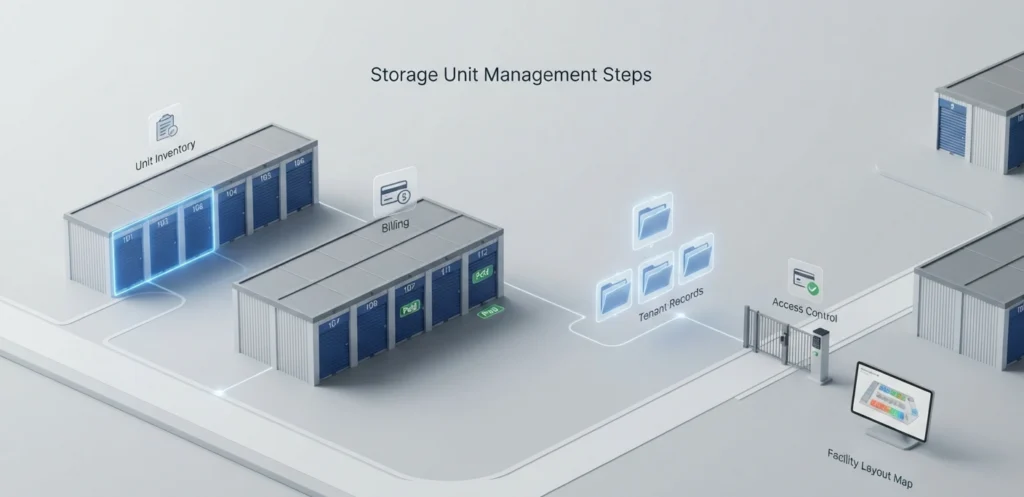
Step 1: Map Your Unit Inventory
Enter every unit size, price, and location into the system. This creates a visual floor plan you can click through instead of walking the property.
- Assign unit numbers and sizes
- Set base pricing per unit type
- Mark climate-controlled or drive-up units separately
Step 2: Set Automated Billing Rules
Configure rent due dates, late fees, and payment reminders once. The system then repeats this every month without your input.
- Enable auto-pay for tenants who opt in
- Set grace periods before late fees apply
- Turn on SMS or email payment reminders
Step 3: Digitize Tenant Records
Move every tenant file into searchable digital profiles. This includes lease agreements, ID scans, and payment history.
- Store emergency contact details
- Track lease start and end dates
- Log communication history per tenant
Step 4: Connect Gate Access Control
Link your dashboard to smart locks or gate systems. Tenants get access codes automatically after payment, and access shuts off automatically if they fall behind.
Tenant Management Dashboard Features That Matter
Not every dashboard feature adds real value. Focus on these core tools first.
Automated Communication
Tenants expect text and email updates, not phone calls. A good system sends automatic reminders for:
- Upcoming rent due dates
- Overdue balances
- Insurance or protection plan renewals
- Move-out confirmations
Online Tenant Portal
Give tenants a self-service login. They can pay rent, update contact info, and view their lease without calling your office.
Delinquency and Lien Management
Late payments hurt cash flow fast. A dashboard should track delinquent accounts automatically and flag units heading toward auction status per your state’s lien laws.
Pairing this with a centralized storage unit manager built for facility owners in your area helps you catch overdue accounts before they become write-offs.
Protecting Tenant Belongings and Revenue
Damage claims and theft disputes cost facility owners real money every year. Offering tenant protection plans reduces this risk while adding a revenue stream.
Many dashboards now let you sell coverage directly during the move-in process. This works alongside options like 6Storage’s tenant protection plans, which cover belongings without requiring separate insurance paperwork.
Reporting and Financial Tracking
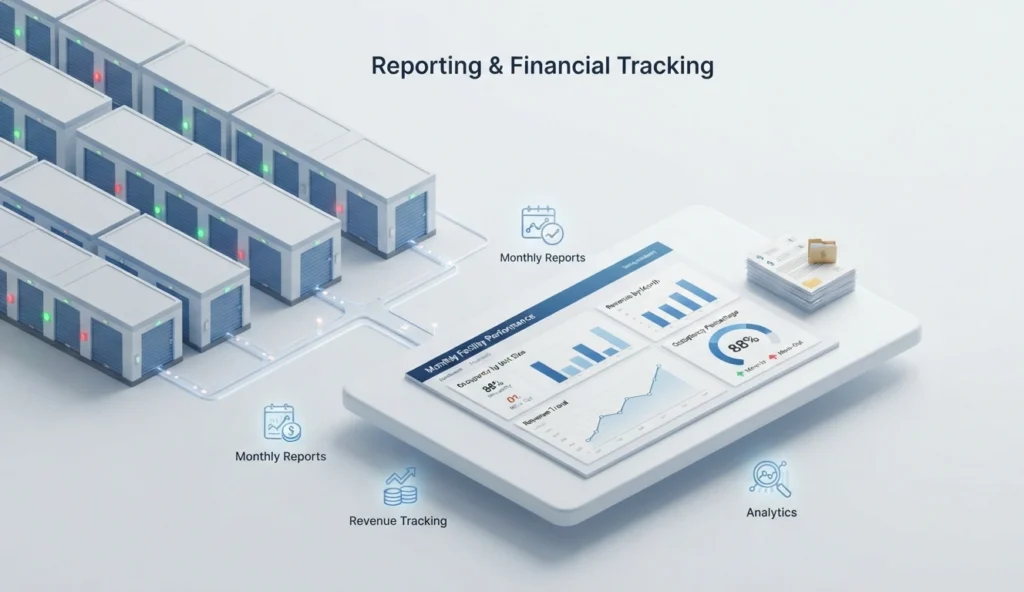
A dashboard should turn hours of spreadsheet work into a single click. Look for reports covering:
- Monthly occupancy rate trends
- Revenue per unit type
- Delinquency percentage
- Move-in and move-out volume
These numbers help you decide when to raise rates or add more units. If you’re still planning your facility budget, understanding what it costs to open a storage facility helps you set realistic software and staffing costs from day one.
Choosing the Right Software for Multi-Location Growth
If you operate more than one facility, your dashboard needs to handle multi-site reporting. Look for these specific capabilities:
- Cross-location occupancy comparison
- Centralized tenant database across sites
- Region-specific pricing rules
- Staff permission levels by location
A centralized storage unit manager designed for growing regional operators lets you open new locations without adding separate software logins for each site.
Common Mistakes Owners Make With Dashboards
Even good software fails when setup is rushed. Avoid these errors:
- Skipping staff training: Employees revert to old habits if they don’t understand the new system.
- Ignoring automated reports: Data sitting unused doesn’t improve your business.
- Ontering incomplete tenant data: Missing phone numbers or emails break automated reminders.
- Not testing gate integration: Always confirm access control syncs correctly before go-live.
FAQs
Do I need special training to use a storage management dashboard?
No, most dashboards are built for non-technical users. Basic onboarding usually takes a few hours, not days.
Can a dashboard handle multiple storage locations at once?
Yes, most modern platforms support multi-site management from a single login. You can compare occupancy and revenue across locations instantly.
What happens if the internet goes down at my facility?
Most cloud-based dashboards cache recent data locally for short outages. Gate access systems typically have backup power and offline modes too.
Is tenant data safe on a cloud dashboard?
Yes, reputable providers use encrypted servers and regular backups. Always confirm your provider follows data protection standards before signing up.
How much does self-storage management software typically cost?
Pricing usually ranges based on unit count and features needed, often billed monthly per facility. Many providers offer tiered plans for small versus multi-location operators.
Can tenants pay rent directly through the dashboard?
Yes, most systems include an online tenant portal for card or bank payments. This reduces late payments and cuts down on manual cash handling.
Will switching software cause me to lose old tenant records?
No, most providers offer data migration support during onboarding. Your existing tenant and payment history typically transfers within a few days.
Does a dashboard help with facility security?
Yes, dashboards often integrate with cameras, gate logs, and smart locks. This creates a digital trail for every entry and exit.
How long does it take to fully set up a storage dashboard?
Most facilities complete setup within one to two weeks, including staff training. Larger multi-site operations may need slightly longer for full data migration.
Conclusion
Knowing how to manage storage units through a dashboard comes down to four things: digital inventory, automated billing, tenant self-service, and clean reporting. These systems replace scattered spreadsheets with one connected view of your entire facility. Owners who switch typically cut administrative time significantly within the first few weeks. Start with unit mapping and billing setup, then layer in tenant communication tools as your team gets comfortable.
The right software doesn’t just save time. It reduces missed payments, protects tenant belongings, and gives you the data needed to grow with confidence.

Leave a Reply