
How to Run a Fully Unmanned Self Storage Facility Remotely?
Running a fully unmanned self storage facility remotely means using smart locks, cloud software, and remote monitoring tools to manage tenants without staff on site. Facility owners across the country are shifting to this model to cut labor costs and boost profit margins. This setup works around the clock without a single employee standing at a front desk. This guide breaks down every step needed to build, run, and grow this kind of operation.
Owners often worry that going unmanned means losing control over their property. That fear disappears once the right systems replace manual tasks with automated ones. This article covers the tools, workflows, and security steps that make remote operation possible. By the end, you will know exactly what to set up first.
Manned vs Unmanned Self Storage Operations
| Feature | Traditional Manned Facility | Unmanned Self Storage Facility |
| Staff cost | $30,000 to $45,000 per year | Near $0 monthly labor cost |
| Operating hours | Limited to business hours | 24/7 access for tenants |
| Check in process | Manual, in person | Self service kiosk or app |
| Payment collection | Front desk or phone | Automated online billing |
| Security monitoring | Human patrol | AI cameras and smart locks |
| Scalability | Hard to manage multiple sites | Easy to run several locations at once |
| Tenant communication | In person or phone calls | Automated texts, emails, and portals |
Why Facility Owners Are Going Unmanned
Labor is the biggest recurring cost for most storage businesses. Cutting it out entirely changes the profit picture fast. Many owners report saving thousands of dollars every month after switching.
Renters also prefer convenience. They can rent a unit at midnight without waiting for office hours. This shift in tenant behavior is pushing more owners toward remote operation models.
Core Technology Stack for an Unmanned Self Storage Facility
You cannot run a site with zero staff without the right digital backbone. Every unmanned setup needs a few core systems working together.
- Cloud based management software for bookings, billing, and tenant records
- Smart access control with app based or keypad entry
- Remote video surveillance with motion alerts
- Automated payment processing and late fee handling
- Digital lease signing tools
These pieces connect through a central dashboard. This is where Unmanned Self Storage Facility operators near any city or region can watch every unit, gate, and payment in real time from one screen.
Smart Access Control Systems
Smart locks replace the need for a manager to hand out keys. Tenants get a unique code or app based entry point tied to their account. Access shuts off automatically the moment a payment is late.
This single feature removes one of the biggest reasons facilities used to need staff on site. Gate codes, unit locks, and elevator access can all sync through one system.
Remote Video Monitoring
Cameras alone are not enough for a true unmanned setup. You need motion triggered alerts sent straight to your phone. Some systems even use AI to flag unusual activity like a door left open too long.
Setting Up Your Facility Management Software
Software is the control center of any unmanned self storage facility. Without it, none of the automation pieces connect properly. Picking the right platform decides how smooth your daily operations run.
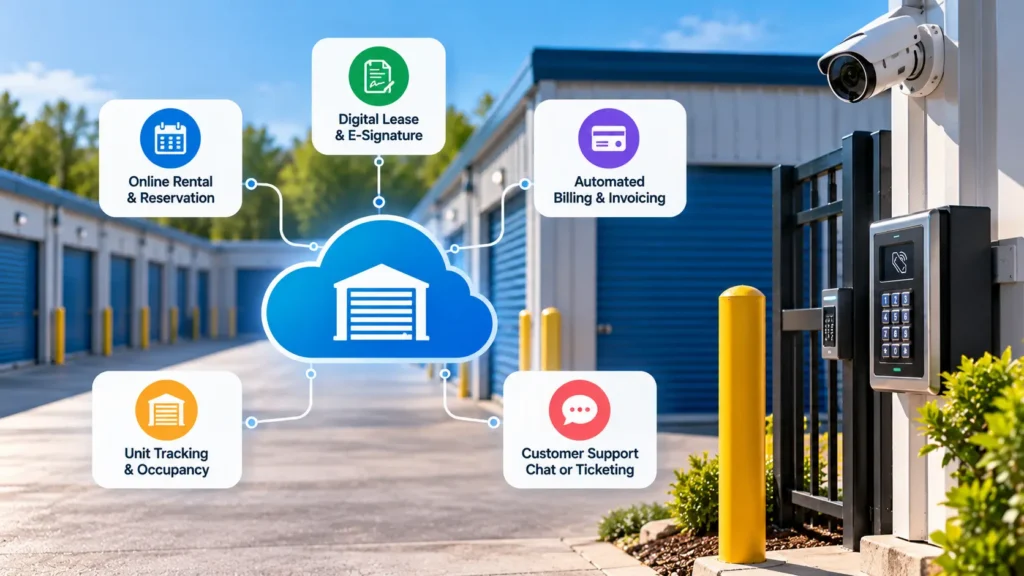
Look for these must have features:
- Online rental and reservation system
- Automated recurring billing and invoicing
- Digital lease and e-signature support
- Real time occupancy and unit tracking
- Built in customer support chat or ticketing
A strong dashboard lets you see everything from unit availability to overdue accounts in one glance. Learning how to manage storage units and tenants via dashboard helps new owners get comfortable fast with daily remote tasks.
Choosing Between Software Platforms
Not every platform fits every business size. Some are built for single site owners while others handle large multi facility groups. Reviewing real examples of storage software before committing saves time and money later.
Compare pricing tiers carefully. Some platforms charge per unit while others charge a flat monthly rate.
Handling Tenant Move Ins Without Staff
The move in process needs to feel simple even with nobody at the counter. A confusing sign up process drives renters away fast. Here is a clean workflow that works for most unmanned sites.
- Tenant browses units and pricing online
- Tenant selects a unit and enters payment details
- System generates a digital lease for signature
- Access code or app credential gets issued instantly
- Automated welcome email confirms move in details
This entire sequence can finish in under five minutes. No phone call or office visit is required at any step.
Security Measures for Remote Storage Sites
Security concerns come up often when owners first consider going unmanned. The good news is that automated security often performs better than a single overnight guard. Multiple layers working together close most of the gaps.
- Motion activated lighting across the property
- Individual unit door alarms
- Cloud recorded footage with 90 day storage minimum
- Text alerts for gate breaches after hours
- Perimeter fencing with coded entry points
Combine these with routine software updates and password protocols. Weak passwords remain one of the top causes of security breaches at automated facilities.
Handling Payments and Delinquent Accounts Remotely
Getting paid on time matters even more without staff to chase down late renters. Automation solves most of this problem quietly in the background.
- Auto charge saved payment methods each billing cycle
- Send automated reminders three days before due dates
- Lock access automatically after a set grace period
- Escalate to lien and auction workflows without manual tracking
- Offer multiple payment options including card, ACH, and digital wallets
This system runs itself once configured correctly. Owners only need to step in for exceptions or disputes.
Should You Manage It Yourself or Outsource
Some owners choose to run everything themselves using software alone. Others bring in a third party management company to handle tenant issues and marketing. Reading through whether 3rd party self storage management is better than managing it yourself helps clarify which path fits your time and budget.
Self management works best for owners comfortable with tech and customer service by phone or chat. Outsourcing works better for owners with multiple properties spread across different regions.
Customer Support Without a Front Desk
Tenants still need help sometimes even at an unmanned site. A missing support option frustrates renters fast and hurts reviews. Build a support system before you need it.
- Live chat widget on your booking website
- Dedicated support phone line answered by a call center
- FAQ page addressing common access and billing questions
- Video call option for urgent access issues
Marketing an Unmanned Self Storage Facility
Getting tenants in the door still requires visibility online. Local search rankings matter more than ever since renters search on their phones first. Optimize your Google Business Profile with accurate hours and photos.
Encourage happy tenants to leave reviews mentioning ease of access and quick sign up. Reviews build trust for renters who feel nervous about a site with no staff present.
Common Mistakes to Avoid
- Skipping backup power for smart locks during outages
- Ignoring software updates that patch security holes
- Failing to test emergency access procedures regularly
- Underestimating internet connectivity needs at rural sites
- Forgetting to train tenants on app based entry during move in
FAQs
Can a self storage facility really run with zero employees?
Yes, many facilities today operate fully unmanned using smart locks, cloud software, and remote cameras. Owners handle exceptions remotely through phone or chat support.
How much money can I save by going unmanned?
Most owners save between $30,000 and $45,000 a year by removing full time staff. Savings vary based on facility size and local wage rates.
What happens if a tenant gets locked out after hours?
Most systems include a mobile app or backup code that tenants can use to regain access instantly. A support line also stays available for urgent lockout issues.
Is unmanned self storage safe for tenants?
Yes, modern setups often include more cameras and alarms than traditional staffed sites. Automated alerts respond faster than a single night guard checking the property occasionally.
Do I need internet access at every unmanned site?
Yes, reliable internet keeps smart locks, cameras, and payment systems connected at all times. A backup connection or cellular failover is recommended for rural locations.
Can I convert my existing manned facility to unmanned?
Yes, most owners transition gradually by adding smart locks and software before removing staff completely. A trial period with reduced hours often works well during the switch.
What software features matter most for remote management?
Automated billing, real time occupancy tracking, and digital lease signing matter most for daily remote operations. A strong dashboard ties all these features into one screen.
How do I handle move outs without staff present?
Tenants confirm their move out date through the app or portal, and the system automatically ends their lease and revokes access. A final walkthrough photo requirement can confirm unit condition remotely.
Are unmanned facilities more profitable than staffed ones?
Yes, removing labor costs while keeping the same rental income increases profit margins significantly. Many owners see returns on their technology investment within the first year.
Conclusion
Running a fully unmanned self storage facility remotely comes down to picking strong software, smart locks, and a solid security setup. Owners who automate billing, move-ins, and support save thousands of dollars every year in labor costs. The technology handles routine tasks while owners focus on growth and expansion. Start with one system at a time instead of trying to automate everything at once.
Success depends on testing every workflow before removing staff completely. Check your access system, payment automation, and security cameras during a trial period first. Fix any gaps before advertising 24/7 access to renters. With the right setup, remote management becomes simpler than traditional staffed operations.

Leave a Reply