

Integrating License Plate Recognition (LPR) with Self Storage Gate Hardware
You integrate License Plate Recognition with gate hardware by connecting an LPR camera to your gate controller through a relay or network trigger, then syncing plate data with your tenant records. The camera reads the plate, the software checks the tenant’s status, and the gate opens only for approved vehicles. This setup replaces keypad codes, reduces tailgating, and lets unmanned facilities run around the clock. It also creates a clean log of every vehicle that enters or leaves.
The right mix of cameras, controllers, network gear, and storage management software makes this work. One weak link causes missed reads, stuck gates, and frustrated tenants. This guide covers hardware choices, wiring logic, installation steps, and backup plans for outages. Use it as a checklist before you sign with any vendor or installer.
Gate Integration Methods at a Glance
| Integration Method | How It Connects | Best For | Install Effort | Main Risk |
| Dry contact relay | Camera relay output wired to the gate controller input | Older sliding or swing gates | Low | No tenant data sync without extra software |
| Wiegand output | Camera sends a credential number to the access controller | Sites with an existing keypad system | Medium | Short cable limits and wiring errors |
| OSDP or RS485 | Encrypted serial link between reader and controller | Secure, larger facilities | Medium | Needs compatible controller firmware |
| API or cloud integration | Camera talks to management software over the network | Multi site operators and remote management | Medium to high | Depends on a stable internet connection |
| All in one LPR gate kiosk | Camera, controller, and display in one unit | New builds and full gate replacements | Low | Higher upfront cost |
Core Hardware Components
Every LPR gate setup needs four building blocks. Each one affects read speed and uptime.
LPR Cameras
Choose a camera built for plate capture, not a general security camera. Look for infrared illumination, a fast shutter, and onboard edge processing. Edge processing reads the plate inside the camera, so the gate opens quickly even when the network is slow.
Gate Controller and Relay
The controller is the brain that decides when the gate opens. It receives a signal from the camera or software and triggers the gate operator. Confirm that your gate operator accepts an external dry contact input before you buy anything.
Network and Power
Use a wired Ethernet connection to the camera whenever possible. Wi Fi and LTE work as backups but add delay. Add a small UPS so the camera and controller stay alive during a brief power cut.
Loop Detectors and Safety Sensors
Vehicle loops tell the system a car is present and keep the gate from closing on it. Pair them with photo eyes for safety. These sensors also help the camera time its capture.
License Plate Recognition Gate Logic
The gate logic is the set of rules that turns a plate read into an open or closed gate. Good rules protect revenue and reduce staff calls.
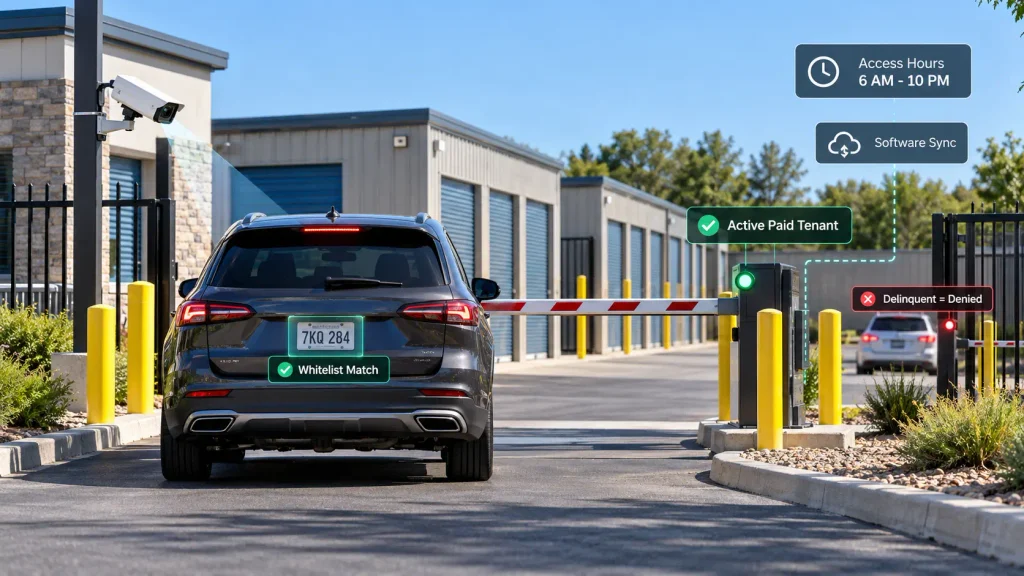
Whitelist and Tenant Matching
Each tenant’s plate is stored against a unit and a lease status. When the camera reads a plate, the system checks that record in under a second. Only active, paid tenants get an automatic opening.
Delinquency and Time Rules
Connect gate access to payment status so overdue accounts are denied at the gate. You can also set access hours, such as 6 AM to 10 PM. Tenants who pay late can then be restored instantly once they pay.
Software Sync
Your gate is only as smart as the data behind it. Pairing License Plate Recognition for local storage facilities with a cloud based management platform keeps plates, leases, and gate rules in one place. A tenant who moves in online can drive through the gate the same day.
Step by Step Installation
Follow this order to avoid rework.
- Audit the gate type, operator model, and available inputs.
- Map the vehicle path and pick a camera spot.
- Run Ethernet and low voltage power to the pole or kiosk.
- Mount the camera and aim it at the plate zone.
- Wire the relay or Wiegand line to the controller.
- Connect the camera to your management software through the API.
- Load test plates and run 20 or more live entries.
- Train staff on the override process.
Test with different vehicle types, including pickups, vans, and motorcycles. A setup that works for sedans can fail on a tall truck.
Camera Placement and Lighting
Placement decides read accuracy more than camera price. A great camera in the wrong spot misses plates all day.
- Mount the lens 3 to 4 feet above the ground for most cars.
- Keep the horizontal angle under 30 degrees to the plate.
- Place the camera 10 to 20 feet from the stopping point.
- Avoid aiming at the sunrise or sunset line.
- Add infrared lighting for night reads.
- Shield the lens from rain drips and direct headlights.
Clean the lens on a schedule. Dust, spider webs, and salt spray lower accuracy slowly, and nobody notices until complaints start.
Backup Entry Methods
Even the best gate fails sometimes. Plan for it before it happens.
Keep a keypad or mobile credential as a second way in. Smart locks and digital keys pair well with plate reads because tenants get a fallback on their phone.
Internet loss is the most common failure. Read this guide on cloud access control failures during an internet outage to set up local caching, so the gate keeps working from stored plate lists. A manual release lever should also be easy to reach and clearly labeled.
Security and Data Handling
Plate data is personal data, so treat it with care.
- Encrypt data between the camera, controller, and cloud.
- Change default camera passwords on day one.
- Limit staff access with role based permissions.
- Set a clear retention period for images and logs.
- Post a sign that tells visitors cameras are in use.
Audit logs matter too. They show who entered, when, and which plate was read. That record helps in disputes and insurance claims.
Real World Setup Patterns
Most facilities follow one of three patterns.
- Retrofit: Keep the current gate and add a camera plus relay. This is the lowest cost route.
- Hybrid: Keep the keypad and add plate reads as the primary entry. Tenants choose either option.
- Full replacement: Install a new gate with a built in reader and kiosk.
Looking at examples of storage software helps you compare how different platforms handle gate rules, tenant portals, and reporting. Match the pattern to your budget and gate age, not to a vendor’s sales pitch.
Common Mistakes to Avoid
Small errors cause most LPR complaints.
- Buying a camera before checking gate operator inputs
- Mounting the lens too high or too far away
- Skipping a UPS and losing power during storms
- Ignoring plate formats from other states or provinces
- Forgetting to update plates when tenants change vehicles
- Giving every employee admin rights
A one hour test with staff cars before launch catches most of these.
FAQs
Can LPR work with my existing gate operator?
Yes, in most cases. If your operator has a dry contact or open input, a camera relay can trigger it. Check the manual or ask the gate manufacturer before buying.
How accurate is LPR in rain, snow, or darkness?
Accuracy stays high with infrared lighting and a well aimed lens. Heavy snow, mud on plates, and glare can still cause misses. Expect a few percent of failed reads and plan a fallback entry.
How much does an LPR gate upgrade cost?
Costs vary by site size and hardware. A single lane retrofit often runs from a few thousand dollars, while full kiosk replacements cost far more. Ask vendors for install, software, and yearly support fees separately.
What happens when a tenant gets a new vehicle?
The tenant or staff updates the plate in the management portal. Many systems let tenants do this themselves from a phone. The change takes effect in seconds.
Can visitors and movers enter without a registered plate?
Yes, through temporary access. Staff or the tenant can add a plate for a set time window, or send a one time code. The entry expires automatically after the window ends.
Does LPR stop tailgating?
No, it reduces it but does not remove it. A second car can still follow a tenant through an open gate. Short gate close times, loop sensors, and a second camera on the exit lane help close the gap.
How long can I keep plate images and logs?
Retention rules depend on your state and local privacy laws. Many operators keep records for 30 to 90 days unless a claim requires longer. Ask a local attorney to confirm the right period for your site.
Can two tenants share one vehicle plate?
Yes, if your software supports multiple units per plate. The system links the plate to each active lease and checks the status of each one. Set a rule for which unit’s status controls the gate.
Do rental trucks cause problems for plate reads?
They can. Rental trucks have tall bodies and plates from other regions, which may sit outside the normal camera angle. Use a wider capture zone or offer a temporary code for moving days.
Conclusion
A strong gate setup starts with matching the integration method to your gate operator and software. Place the camera correctly, wire the relay or API cleanly, and test with many vehicle types. Add a UPS, a manual release, and a second entry method so tenants are never locked out. These steps protect both uptime and revenue.
Review your current gate before you spend money, then compare vendors against the table above. Choosing License Plate Recognition for storage units in your area works best when the camera, controller, and management platform share one tenant database. Visit 6Storage to see how that connection supports daily operations. A careful rollout turns your gate into a quiet, reliable part of the business.

Leave a Reply