
Troubleshooting Cloud Access Control Failures During Internet Disruption
Troubleshoot a cloud access control outage by confirming your internet link, switching gate controllers to offline mode, checking power, and resyncing the system once service returns. Cloud Access Control Failures hit hardest when tenants arrive after hours and the keypad stops responding. A dead gate means angry calls, blocked move-ins, and lost rental income. Most fixes take under 30 minutes when you work in the right order.
This guide gives you a quick diagnosis table, step by step repairs, and prevention tips built for self storage operators. It also covers the hardware and software features that keep gates working when the internet drops. Use it as a checklist for your on site team and your remote managers. Keep a printed copy of the table near your office router.
Quick Diagnosis Matrix
| Symptom | Likely Cause | First Check | Typical Fix |
| Keypad does not respond | Router or ISP down | Test internet on an office laptop | Reboot modem, call ISP |
| Some codes work, others fail | Outdated local cache | Check last sync time | Force a sync after the link returns |
| Keypad works, app does not | Cloud server unreachable | Check vendor status page | Run in offline mode until restored |
| All gates and doors dead | Power loss at controller | Check breaker and UPS | Restore power, reboot controller |
| New tenant codes rejected | Stalled sync queue | Review pending updates | Resend codes manually |
| Controller shows offline light | Bad cable or PoE switch | Reseat cable, test port | Replace cable or switch |
| Random lockouts | Weak WiFi or cell signal | Check signal strength | Add a wired line or LTE backup |
Why Outages Lock Tenants Out
Many Cloud Access Control Failures start with one weak point, such as a single router or a single ISP line. If the controller must ask a remote server to approve every PIN, a lost connection means every request fails.
Three common triggers show up again and again:
- ISP outages caused by storms, construction, or line cuts
- Firewall or DNS changes that block controller traffic
- Cloud platform downtime on the software vendor side
Facilities in storm heavy areas such as the Gulf Coast or Florida see these outages more often. Rural sites with a single provider face the same risk.
Fixing Cloud Access Control Failures Step by Step
Work through these steps in order. Each one rules out a cause before you move on.
Check the Network First
Start at the router, since it is the most common culprit.
- Test the internet on a laptop connected to the same network.
- Look at the modem and router lights for errors.
- Reboot the modem, wait two minutes, then reboot the router.
- Confirm the controller has an IP address and can reach the internet.
If the internet works but the controller stays offline, check for a changed DHCP lease or a blocked port.
Switch to Offline Mode
Most modern gate controllers store approved codes locally. Offline mode lets them keep approving tenants without a cloud check.
- Confirm the controller shows offline or local mode
- Test a known good tenant code at the keypad
- Test a delinquent code to confirm it is still blocked
- Note the time so you can review the gate log later
Offline mode only works if the cache was current before the outage.
Verify Power and Hardware
A network problem can look like a hardware problem. Rule out the basics.
- Check breakers, surge protectors, and the UPS battery
- Confirm the PoE switch is delivering power to each controller
- Inspect keypad wiring for water damage or loose terminals
- Test the gate motor with the manual release
Resync After Recovery
When the internet returns, do not assume the system caught up on its own.
- Compare the controller sync time with the current time
- Push any new move ins, move outs, and overlock changes
- Review the gate log for entries recorded during the outage
- Test three random tenant codes at different keypads
Build Resilience Before the Next Outage
Fast repairs help, but prevention saves more money. A few upgrades cut downtime sharply.
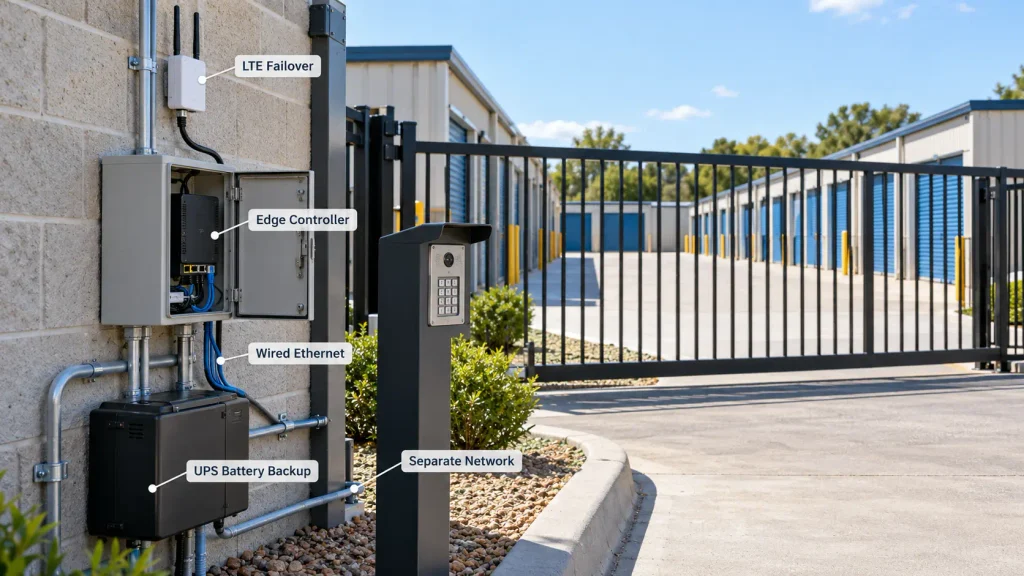
- LTE failover: A cellular backup router takes over when your main line drops.
- UPS battery backup: It keeps controllers and switches running through short power loss.
- Edge controllers: These store tenant data on site and decide access locally.
- Wired connections: Ethernet beats WiFi for gates and door controllers.
- Separate network: Put access hardware on its own VLAN to avoid office traffic issues.
Hardware choices matter too. Learn how smart gate systems that prevent unauthorized after hours access handle security when connectivity is weak.
Software Features That Matter
Your facility management software decides how well your gates survive an outage. Ask vendors direct questions before you sign.
- Does the controller keep a local cache of tenant codes?
- How long can it run offline?
- Does it queue changes and sync them on its own?
- Are gate logs stored locally and uploaded later?
- Does the vendor publish an uptime record and status page?
Review examples of storage software to see how different platforms handle offline access. Price should not drive the choice alone, but you can compare plans using this guide on which self storage software has the best prices.
Staff Outage Playbook
A written plan keeps your team calm. Share these steps with every manager and part time employee.
- Confirm the outage using the diagnosis table.
- Switch controllers to offline mode.
- Post a notice on the website and send a text to tenants.
- Station a staff member or use the manual override during peak hours.
- Record the start time, end time, and affected units.
- Run a full resync and test before closing the incident.
Multi site operators should assign one person to coordinate across locations. That keeps messages consistent and avoids duplicate calls to the ISP.
Monitoring and Prevention
Alerts beat angry phone calls. Set up monitoring so your team hears about problems first.
- Track controller heartbeat so Cloud Access Control Failures trigger an alert before tenants call
- Enable email and SMS notices when a device goes offline
- Review gate logs weekly for repeated failed entries
- Test offline mode every quarter
- Keep spare cables, a PoE switch, and a keypad on site
Document your network layout, static IP addresses, and vendor support numbers in one shared file. During an outage, nobody wants to hunt for a login.
FAQs
Can storage gates work without the internet?
Yes, if the controller stores approved codes locally. Gates with offline mode keep approving valid PINs during an outage. Gates that need a live cloud check will fail.
How long can a gate controller run offline?
It depends on the hardware and software. Many controllers run for days or weeks, but new move-ins and code changes will not sync until the link returns.
Why does my keypad work but the app does not?
Your controller may still run on its local cache while the cloud server is unreachable. The app needs the vendor server, so it fails first. Check the vendor status page to confirm.
Will tenants be locked out during an internet outage?
No, not if offline mode is active and the cache is current. Tenants with valid codes should enter as normal. Only new or changed accounts may be affected.
What should I do first when the gate stops responding?
Test the internet on a laptop and check the router lights. Then confirm the controller has power. These two checks solve most outages.
Can delinquent tenants enter during an outage?
Not usually. Controllers keep the last known access rules, so blocked tenants stay blocked. Past due changes made during the outage will only apply after a sync.
Is LTE failover worth the cost?
Yes, for most facilities. A cellular backup is cheap compared to a day of blocked entry and missed move-ins. It also helps with security cameras and payment kiosks.
Does WiFi or Ethernet work better for gate controllers?
Ethernet works better. Wired connections handle weather, interference, and distance more reliably than WiFi. Use WiFi only when cabling is not possible.
How often should I test offline mode?
Test it every quarter and after any software or network change. Unplug the internet line, try a valid code, then restore the link and confirm the sync.
Conclusion
The fastest way to handle an outage is to follow a fixed order: check the network, switch to offline mode, confirm power, and resync. Strong backups such as LTE failover, a UPS, and local controller storage keep tenants moving. A trained team with a printed playbook cuts response time further. Reliable Cloud Access Control Failures planning starts with choosing software that does not depend on a constant connection.
Review your current setup this week and test offline mode before a real outage forces the issue. Compare vendors on uptime, cache length, and support response. Visit 6Storage for tools built to keep facilities running. A small investment now protects your revenue, your tenants, and your reputation.

Leave a Reply