
Monitoring Solutions for Self Storage: Smart Sensors, Cameras, and Access Logs
The best way to monitor a storage facility is to combine smart sensors, cameras, and access logs in one system that sends alerts to your phone. This layered setup shows who entered, which unit opened, and what happened next. Modern solutions for self storage tie these tools to your software so every event is recorded and searchable. Operators can then run the site remotely with fewer staff hours and fewer surprises.
Break ins, unpaid units, and tenant disputes cost owners thousands of dollars each year. Good records settle most of those problems before they grow. This guide covers what each tool does, how to connect them, and what to check before you buy. Every section gives steps you can apply at a single site or across a chain of facilities.
Monitoring Tools at a Glance
| Tool | What It Tracks | Best Use | Typical Alert | Cost Level |
| Door sensors | Unit door open or close events | Catching unauthorized entry | Door open after hours | Low |
| Smart locks | Who unlocked a unit and when | Unattended or remote sites | Wrong code entered | Medium |
| IP cameras | Live and recorded video | Proof for disputes and claims | Motion in a restricted zone | Medium |
| Gate access control | Keypad codes and entry times | Tenant entry and exit records | Code used after hours | Medium |
| Environmental sensors | Temperature, humidity, water | Climate controlled units | Leak or humidity spike | Low to medium |
| Audit logs in software | Staff and tenant actions | Accountability and compliance | Unusual admin change | Often included |
Smart Sensors
Sensors are the first layer. They watch the units and the building, then report every change.
Door and Unit Sensors
A door sensor marks the moment a unit opens or closes. It sends that event to your dashboard within seconds.
Common uses include:
- Flagging a door left open overnight
- Spotting a unit opened by someone with no active rental
- Confirming a tenant moved out before you re-rent
Wireless IoT sensors are easy to install and need little wiring. Check battery life before you buy, since dead batteries create blind spots.
Environmental Sensors
Climate controlled units need their own watch. Temperature and humidity sensors protect stored goods and lower your claim risk.
Water leak sensors near roof lines and drains give early warning. A five minute alert can save a whole row of units.
Sensors work best when paired with Solutions for Self Storage that log every alert in one dashboard. Without that link, alerts pile up in separate apps and get ignored.
Security Cameras
Cameras add proof. A sensor says a door opened, and a camera shows who opened it.
Camera Placement
Focus on the points where people and vehicles pass through. Good coverage usually includes:
- The front gate and keypad
- The office entrance and payment kiosk
- Each hallway and elevator in indoor buildings
- Loading areas and driveway corners
- The back fence line
Aim cameras away from direct sunlight and headlights. Glare ruins night footage.
Video Retention
Decide how many days of video you keep. Thirty days covers most disputes, while ninety days suits sites with frequent claims.
Cloud storage costs more per month but survives theft of the recorder. On site NVR units cost less over time but need backup. Pick the option that fits your budget and risk level.
Access Logs
Access logs are the quiet hero of facility security. They record every gate entry, keypad code, and door event with a time stamp.
Gate and Keypad Data
Each tenant should have a unique code. Shared codes destroy your audit trail.
Review these patterns weekly:
- Codes used at odd hours
- Many failed attempts on one code
- Tenants who never visit but keep paying
- Codes still active after move out
Strong solutions for self storage let you search these logs by unit, date, or tenant name. That speed matters when a tenant claims a loss.
Staff Activity Logs
Employees can create risk too. Track who changes rent rates, waives late fees, or opens the gate manually.
A clear audit log protects honest staff and exposes bad habits early.
Connecting Everything to Software
Hardware alone creates noise. Software turns that noise into action.
Self storage management software should pull sensor events, gate data, and camera clips into one screen. Platforms like 6Storage show how tenant records, billing, and access rules can live together. Seeing a lockout, a late payment, and a video clip side by side saves hours.
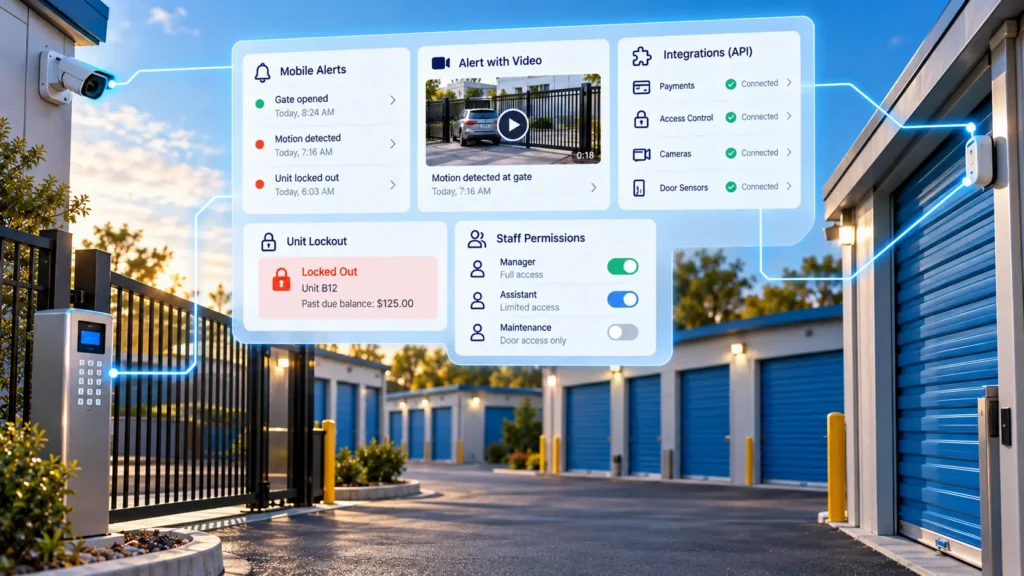
Look for these integration features:
- Automatic gate lockout for unpaid tenants
- Video clips attached to alerts
- Mobile apps for owners and managers
- Open API or partner support for common hardware
- Role based permissions for staff
Reviewing examples of storage software for U.S. operators helps you see how different tools handle these links. Budget matters too, so check self storage software pricing for small facilities before you commit.
Choosing Solutions for Self Storage Monitoring
Start with your biggest risk, not the longest feature list. A rural site with no staff needs different tools than a city building with a busy office.
Use this checklist:
- Count your entry points, units, and blind spots.
- List past incidents such as theft, water damage, or gate misuse.
- Match each risk to one sensor, camera, or log.
- Ask vendors how alerts reach your phone and how fast.
- Confirm the system works if internet service drops.
- Request a trial or demo with your own unit layout.
Watch for hidden costs. Monthly cloud fees, per camera licenses, and sensor replacements add up over three years.
Setup Steps
A clean rollout prevents gaps. Follow this order:
- Map the property and mark every door, gate, and corner.
- Install gate control and unique tenant codes first.
- Add cameras at entry points and the office.
- Place door sensors on high value or climate controlled units.
- Connect all devices to your software and test each alert.
- Train staff on what to do when an alert arrives.
- Post visible signs that the site is monitored.
Test every alert with a real event. A silent alarm is worse than no alarm.
Handling Delinquent and Abandoned Units
Monitoring data helps when rent goes unpaid. Access logs show whether a tenant still visits, and sensors show whether the unit has been opened in months.
That evidence supports lien notices and keeps you fair and consistent. For legal steps and timing, read this guide on handling abandoned self storage units in your state.
Keep records of every notice, gate lockout, and video clip. Courts and auction buyers both expect clean paperwork.
Common Mistakes
Avoid these errors that weaken even good systems:
- Buying cameras with no plan to review footage
- Ignoring low battery warnings on sensors
- Leaving default passwords on cameras and gates
- Skipping firmware updates
- Letting former employees keep admin access
- Setting alerts so often that staff stop reading them
Set a monthly check. Walk the site, test a few sensors, and review one week of logs.
FAQs
Do self storage facilities need security cameras?
Yes, cameras are standard for nearly every facility. They deter crime, support insurance claims, and settle tenant disputes with clear video.
How many days of video should a storage facility keep?
Thirty days works for most sites. Keep ninety days if you see frequent claims or serve high value tenants.
Can I monitor my storage facility from my phone?
Yes, most modern systems include a mobile app. You can view live video, lock or unlock the gate, and read alerts from anywhere.
Are door sensors worth the cost?
Yes, for climate controlled and high value units. A sensor costs little compared to one theft claim.
What is the difference between an access log and an audit trail?
An access log records entries through gates and doors. An audit trail records actions inside your software, such as fee changes or account edits.
Do storage units need WiFi for smart sensors?
Not always. Some sensors use cellular, Zigbee, or other low power radio links that connect through a local hub.
Can gate access be shut off automatically for unpaid rent?
Yes, if your software connects to your gate system. The code can lock when a payment goes past due and reopen after the tenant pays.
Is it legal to record video at a storage facility?
Yes, in common areas such as gates, hallways, and offices. Never place cameras inside rented units or restrooms, and follow your state rules on signage.
How do I secure an unmanned storage facility?
Use gate control, unique codes, cameras with motion alerts, and door sensors on each unit. Add remote unlock ability and a clear emergency contact number at the gate.
Conclusion
A strong monitoring plan uses sensors for instant alerts, cameras for proof, and access logs for a clear record. Start with your biggest risk, add tools in small steps, and test every alert. Keep video for at least thirty days and give every tenant a unique code. Review staff activity often so small issues stay small.
The right Solutions for Self Storage connect all of these tools so you see one clear picture instead of five separate apps. Choose a system that fits your budget, your site layout, and your team size. Plan for growth so new buildings can join the same dashboard. Begin with a demo this week and map your entry points before you buy anything.

Leave a Reply