
How Smart Gate Systems Prevent Unauthorized After Hours Access in Storage Facilities?
Smart gate systems prevent unauthorized after hours access by checking every entry attempt against tenant records, time rules, and unit status before the gate opens. Each tenant gets a unique code, app credential, or card that works only during approved hours. If someone tries a shared code, an expired code, or a tailgate entry, the system blocks the attempt and logs it. That record gives owners proof of what happened and gives tenants confidence that their belongings are safe overnight.
Late night break ins, code sharing, and delinquent tenants slipping in are the three biggest gaps at unmanned sites. A modern setup closes each gap through software, hardware, and alerts working together. Managers can change access in seconds from a phone instead of driving to the property. This guide shows how each layer works and what to check before you buy.
After Hours Access Threat Matrix
| Threat | How the System Stops It | Feature to Look For |
| Shared or leaked gate codes | Every tenant has a unique PIN tied to one account | Individual keypad codes |
| Late night entry | Access closes outside set hours | Time based access windows |
| Delinquent tenant entry | Gate denies access once an account is past due | Automatic lockouts |
| Tailgating behind a vehicle | Sensors detect a second vehicle and hold the gate | Loop detectors and anti tailgate logic |
| Stolen or cloned cards | Credentials can be disabled instantly | Cloud based credential control |
| Power or internet outage | Gate keeps working on stored rules | Battery backup and offline mode |
| Unreported break ins | Alerts reach staff in real time | Push and SMS notifications |
Common After Hours Risks
Most theft at storage sites happens when no staff are on the property. Thieves look for easy openings, not hard targets.
The usual weak points include:
- Gate codes that never change
- Tenants who share codes with friends or movers
- Gates that stay open after a vehicle passes
- Old access cards that were never deactivated
- No alert when someone enters at 3 a.m.
A manual gate with a single shared code fails on every point above. That is why owners are moving to credential based control.
Why Smart Gate Systems Beat Manual Locks
A padlock or shared keypad code cannot tell who is entering. It only knows a code was typed. Credential based access knows who, when, and for which unit.
Operators who run Smart Gate Systems connected to their management platform get live control over every tenant account. When a lease ends or a payment fails, access changes without anyone touching the gate.
Unique Access Codes
Each tenant receives a personal PIN or mobile credential. No two people share the same entry.
If a code leaks, the manager disables that one code. Other tenants are not affected.
Time Based Access Windows
Owners set gate hours by facility, unit type, or tenant group. A site might allow entry from 6 a.m. to 10 p.m. for standard units. Climate controlled or vehicle storage can follow a different schedule.
Any attempt outside the window is denied and recorded. Staff can grant a one time exception from a phone.
Automatic Lockouts for Delinquent Accounts
Past due tenants are a quiet security risk. They still know the code and may visit after hours to remove items.
The software can lock the gate and the unit door the moment an account passes its grace period. Access returns as soon as the payment clears. This also supports collections without a confrontation.
Hardware That Backs the Software
Software decisions only matter if the gate follows them. The physical layer must be reliable and hard to defeat.
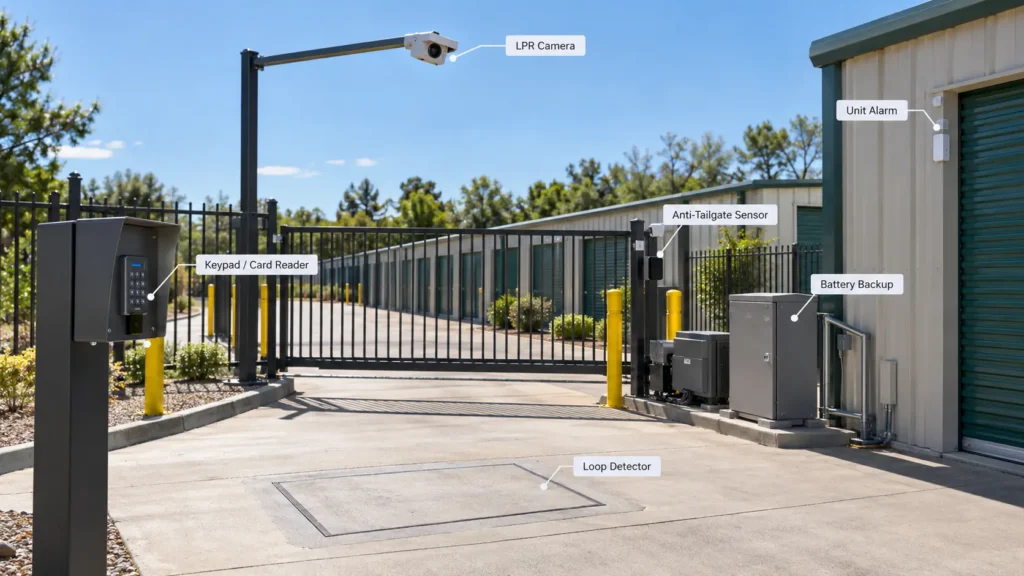
Key hardware components:
- Keypad or card reader: Weather rated and vandal resistant
- Loop detectors: Sense vehicles so the gate does not close on a car
- Anti tailgate sensors: Stop a second vehicle from slipping in behind an approved one
- License plate recognition cameras: Match plates to tenant records
- Gate operator with battery backup: Keeps the gate secure during outages
- Door and unit alarms: Add a second layer inside the property
Choose commercial grade operators. Residential gate motors fail quickly under daily storage traffic.
Alerts and Audit Trails
A gate that records everything is a strong deterrent. Tenants and intruders both behave differently when they know entry is tracked.
Useful alert types include:
- Repeated failed code attempts
- Entry outside approved hours
- Gate held open too long
- Forced gate or door events
- Offline hardware or low battery warnings
Every event is stored with a time, credential, and location. Owners can pull this audit trail for insurance claims or police reports.
Pair gate logs with video. A timestamped clip next to an access record settles most disputes fast.
Management Software Integration
The gate works best when it shares data with your core platform. Standalone gate controllers force staff to update two systems.
An integrated setup syncs rentals, payments, move outs, and access rights automatically. Using examples of storage software as a reference helps you compare which platforms connect natively to gate hardware. Smart Gate Systems that sync in real time reduce manual errors and remove the gap between a missed payment and a locked gate.
Teams that want to understand the buying process can read how to choose gate software for better tenant retention. Smooth entry keeps good tenants happy while keeping bad actors out.
Cost and Value Checks
Price should match the risk you are covering. A cheap gate that lets thieves in costs more than a solid system.
Review these cost factors:
- Hardware and installation
- Monthly software fees
- Per gate or per unit charges
- Credential and keypad replacement costs
- Support and update fees
Operators in a competitive market should compare storage software pricing for local facility owners before signing a contract. Ask for the full cost over three years, not just the first invoice.
Setup Steps for a Secure Rollout
Follow this order to avoid gaps during installation:
- Audit current gate hardware and note weak points.
- Set access hours for each unit type.
- Import all active tenants and assign unique credentials.
- Remove old shared codes and unused cards.
- Configure alerts and assign a staff contact for each type.
- Test the system at night, including outage and tailgate scenarios.
- Tell tenants about new codes and the mobile app before the switch.
Run a short review each month. Check failed attempts, odd entry times, and any hardware faults.
Local Rollout Tips
Security needs vary by neighborhood. A site near a highway, in a dense city, or in a rural area faces different threats.
Consider these local factors:
- Crime patterns in your area and nearby storage facility break in reports
- Local police response times
- Weather, since heat, flooding, or snow affects gate reliability
- Tenant habits, such as early commuters or late shift workers
Tell tenants about your gate hours in the lease and on signs at the entrance. Clear rules reduce support calls and complaints.
FAQs
Can a gate code be shared with someone else?
Yes, a person can tell others their code, but a unique code system limits the damage. Every entry is logged to one tenant account, and managers can disable that single code instantly.
Do smart gates work during a power outage?
Yes, most commercial gate operators include battery backup. Many controllers also store access rules locally so the gate keeps enforcing them without the internet.
What is tailgating at a storage facility?
Tailgating is when an unauthorized vehicle follows an approved one through an open gate. Loop detectors and anti-tailgate sensors hold the gate until the first vehicle clears.
Can I limit access hours for each tenant?
Yes, most platforms let you set hours by unit type, tenant group, or individual account. Attempts outside those hours are denied and recorded.
How do I block a tenant who is behind on rent?
Link your gate to your management software and set a lockout rule after the grace period. The gate and unit access switch off automatically and return once payment posts.
Are license plate readers worth the cost?
Yes, for sites with high traffic or past theft problems. They add a second identity check and give you a clear plate record for every vehicle.
Can I open the gate for a tenant remotely?
Yes, cloud based platforms let managers grant temporary access from a phone or computer. This helps with lockouts, movers, and emergency visits.
Will security cameras replace a gate access system?
No, cameras record events but do not stop entry. Gates control who gets in, while cameras prove what happened.
How often should I change gate codes?
Change a code whenever a tenant moves out, loses a credential, or reports a problem. Systems with unique tenant codes remove the need for site wide code changes.
Conclusion
Reliable after hours security comes from layers: unique credentials, time windows, automatic lockouts, tailgate sensors, and live alerts. Each layer closes a specific gap that manual gates leave open. Strong hardware and an integrated software platform keep those layers working together every night.
Start by auditing your current gate, then choose Smart Gate Systems that sync with your tenant and payment data. Roll out in clear steps, test at night, and review logs monthly. Visit 6Storage to see how a connected platform keeps your property secure and your tenants satisfied.

Leave a Reply